

Your launch monitor tells you what the ball did. It does not tell you why your body made it do that. For golfers pouring hours into a simulator setup, that gap is frustrating: you can see the numbers, but you still cannot see the hip rotation that stalled, the early extension that crept in, or the weight shift that never finished. The Uneekor Performance Optix Pack fills that gap. It is a biomechanical golf training system from Rain Or Shine Golf that adds body-tracking cameras to your existing Uneekor launch monitor, turning raw swing data into actionable movement feedback.
This review covers what comes in the package, how the biomechanical tracking works in practice, and what you need to know before adding it to your setup. We break down the core features, walk through real training scenarios, weigh the pros and cons, and compare it against alternatives for golfers who want more than ball data. By the end, you will know whether the Performance Optix Pack earns a place in your serious practice space or lesson room, and whether your current Uneekor hardware is ready for it.
First Impressions and Package Contents
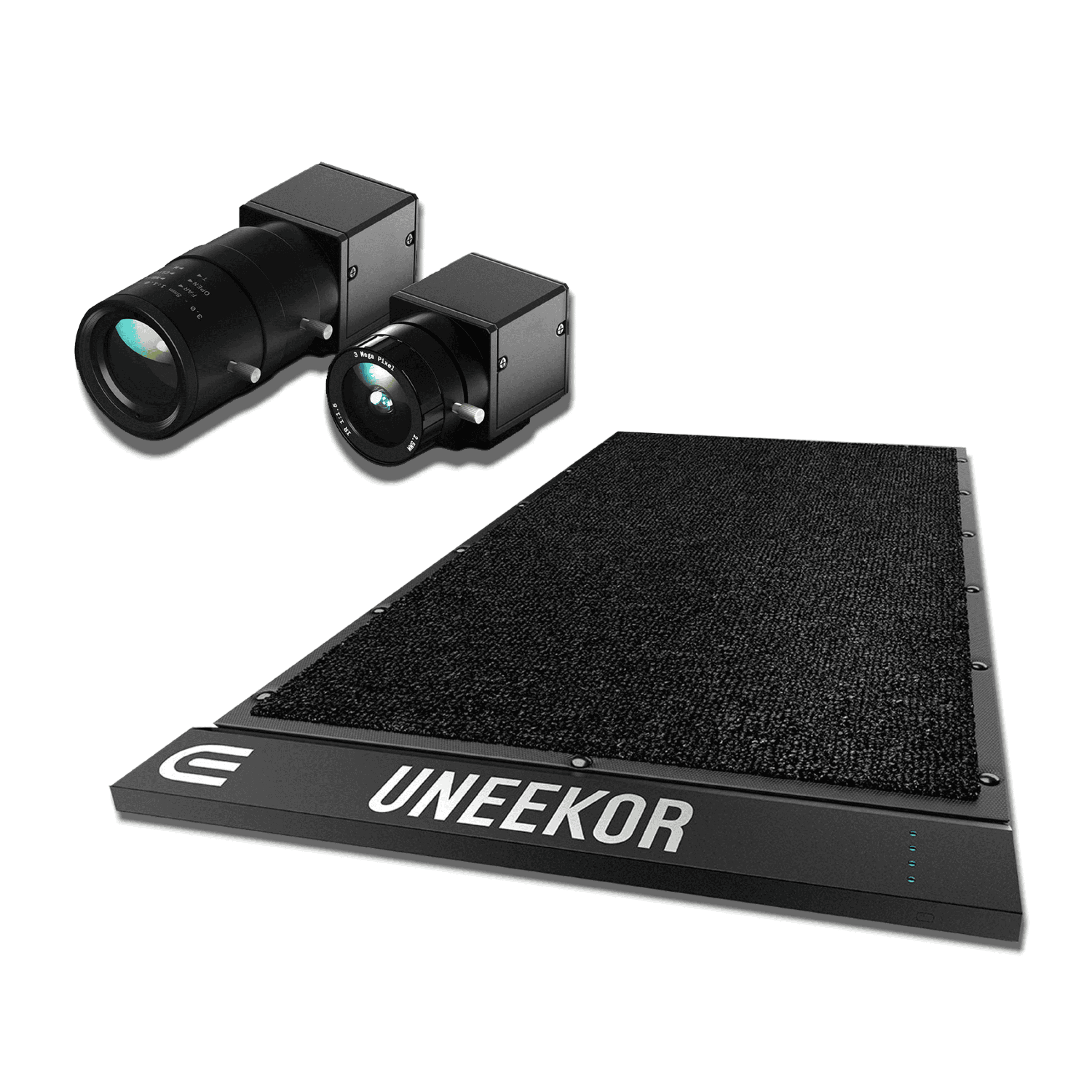
The Uneekor Performance Optix Pack arrives as an add-on system, not a standalone unit. It turns your existing Uneekor launch monitor into a full biomechanical training setup by adding body-tracking cameras and analysis software. You keep the launch monitor you already own; this pack layers movement data on top of ball data.
What Is Included in the Performance Optix Pack
The pack centers on hardware that captures your body motion during the swing. You get the camera system designed to track movement from setup through follow-through. The system integrates with Uneekor View software, which processes the camera data alongside your existing launch monitor output.
Because this is an accessory pack, nothing in the box replaces your current Uneekor hardware. Instead, the components work with what you have. The full picture of every shot comes from combining ball metrics with body mechanics in one interface.
Before you order, SimSquad is your first call for any fitment or compatibility question. SimSquad can answer before you order, which matters here because the pack requires compatible Uneekor hardware to function.
Build Quality and Hardware Components
The cameras mount around your hitting area and track joint positions, posture, and swing sequencing. This is purpose-built golf hardware, not repurposed consumer cameras. The components are designed for repeated indoor use where lighting and space stay consistent.
Compatibility with existing Uneekor hardware is the deciding factor for most buyers. If you already run an Uneekor launch monitor, this pack extends its value without replacing it. If you do not own Uneekor hardware, the pack cannot operate on its own.
The physical setup requires space for camera placement. You need clear sightlines from the cameras to your body throughout the swing. Plan your hitting bay layout before installation so the cameras capture full motion without obstruction.
Rain Or Shine Golf positions this as the most comprehensive swing analysis package Uneekor offers. That claim depends on pairing it correctly with your existing system. The hardware itself is solid; the experience depends on proper integration.
Core Features and Biomechanical Capabilities
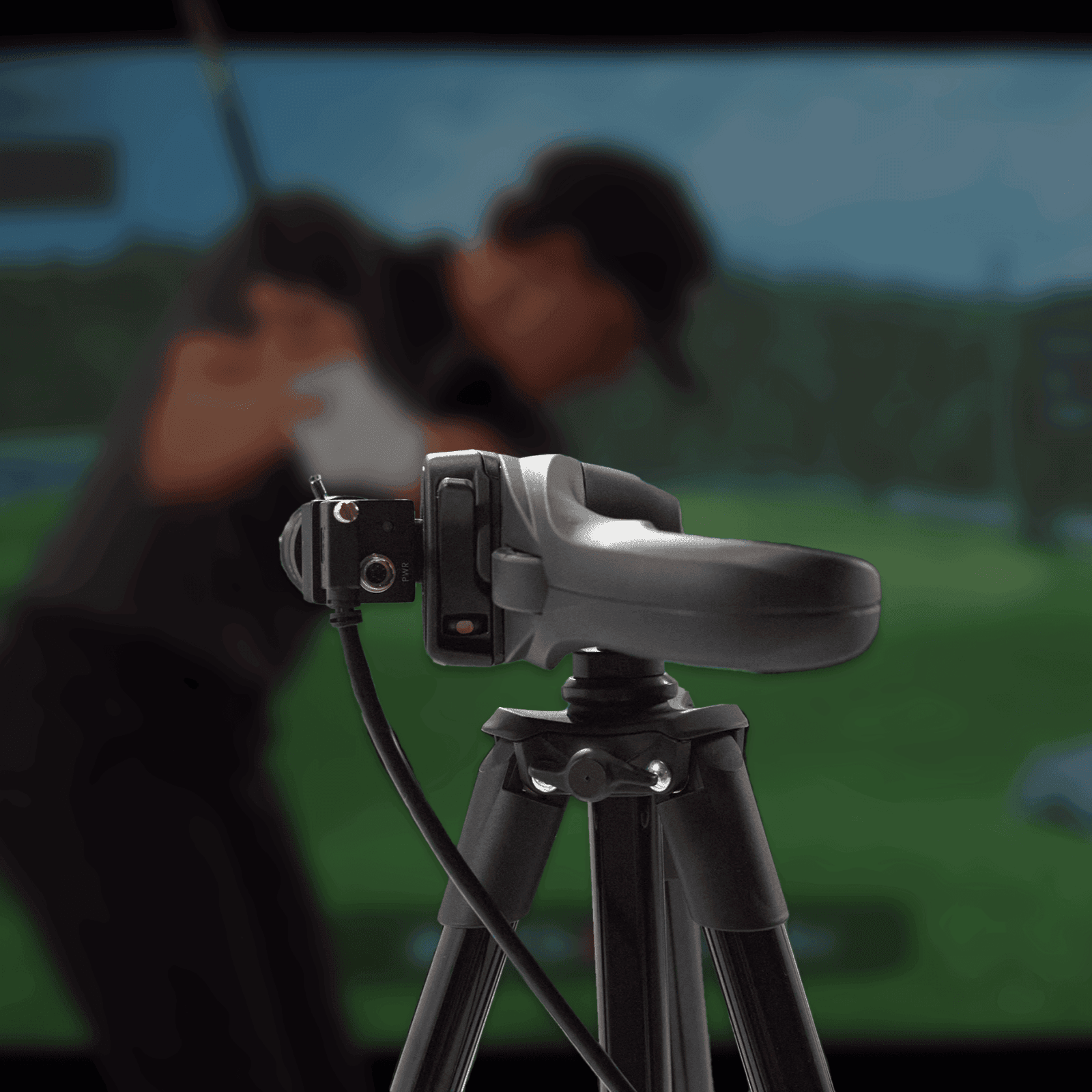
The Uneekor Performance Optix Pack pairs biomechanical body tracking with your existing Uneekor launch monitor, filling the gap between ball data and what your body actually does during the swing. It is an accessory system, not a standalone unit, so it requires a compatible Uneekor launch monitor to function. The package gives you three components working together: two Swing Optix cameras, one Balance Optix pressure mat, and deep integration with Uneekor View Software.
Swing Optix Cameras for Dual-Angle Video Capture
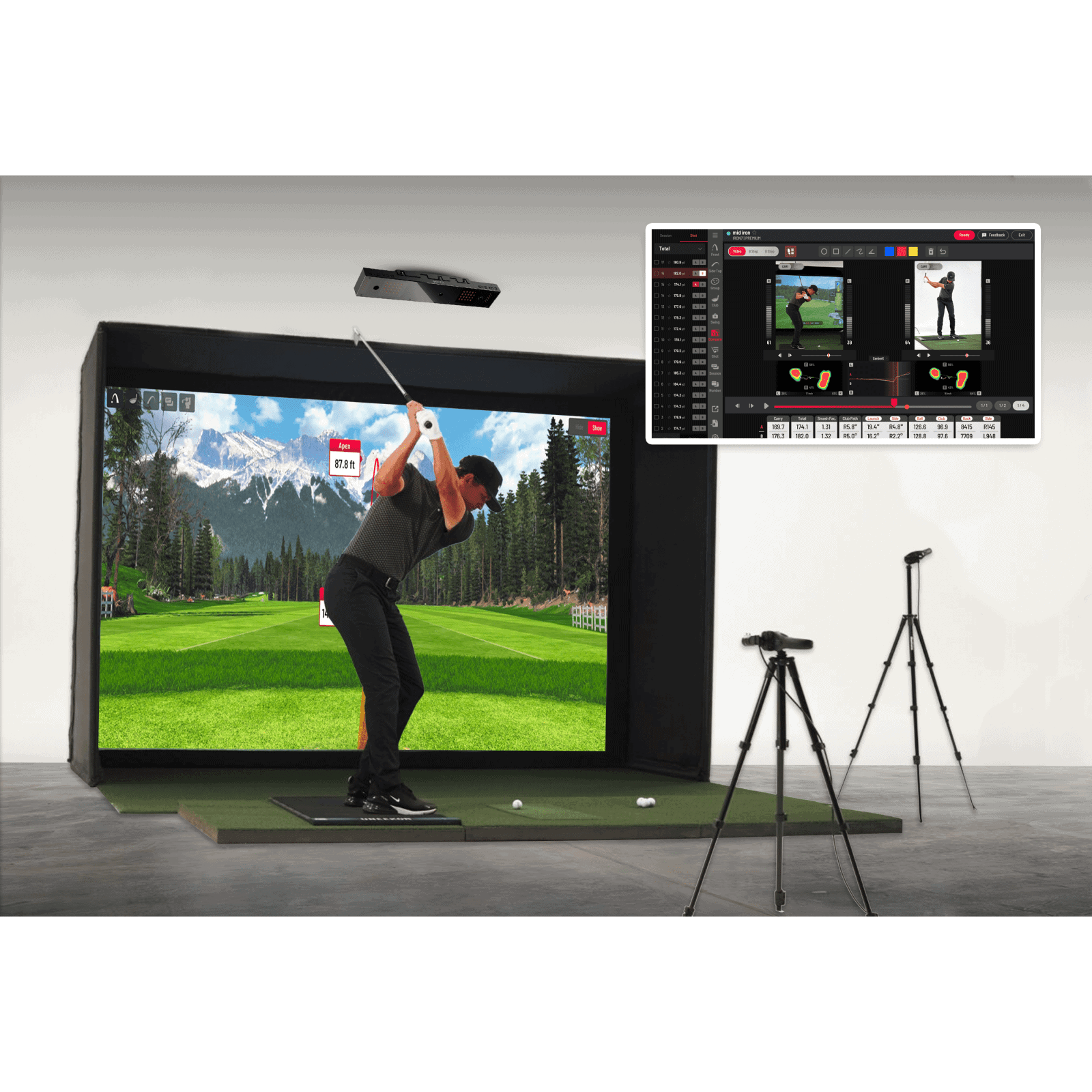
The pack includes two high-resolution Swing Optix cameras that record your swing from two angles: face-on and down-the-target-line. Face-on video shows your posture, arm plane, and clubface position through impact. The down-the-target-line view reveals your swing path and club positioning from behind. Both camera feeds sync directly into Uneekor View Software, where they overlay with your launch monitor data on the same screen. You see your swing mechanics alongside ball speed, launch angle, and spin rate without switching between apps or devices. For golfers who need visual feedback on mechanics rather than just numbers, this dual-angle setup covers the two perspectives coaches use most.
Balance Optix Pressure Mat Sensor Technology
The Balance Optix pressure mat sits under your feet and uses over 1,100 sensors to measure weight distribution throughout the swing. It tracks lateral shifts (side-to-side movement) and vertical shifts (up-and-down motion), showing exactly when and how your weight transfers from backswing through impact. The sensor density captures subtle pressure changes that reveal balance problems, early extension, or inconsistent weight transfer patterns. This data appears as a pressure map in Uneekor View Software, synchronized frame-by-frame with your Swing Optix video and launch monitor output. You can compare your pressure trace against ideal patterns or track changes over a training session.
Uneekor View Software Integration and Data Sync
Uneekor View Software is the hub that ties everything together. It processes camera footage, pressure mat data, and launch monitor metrics in one timeline. When you hit a shot, the software displays your ball data, swing video from both angles, and pressure map simultaneously. This synchronization matters because you can see cause and effect: how a specific weight shift correlates with a particular ball flight, or how a swing path change affects your pressure trace. The system works inside the Uneekor ecosystem, so you are not exporting files between platforms or manually aligning timestamps. For coaching sessions, you can review swings with an instructor and point to specific frames where mechanics broke down, backed by objective pressure and ball data.
The Performance Optix Pack suits golfers who want biomechanical feedback without leaving the Uneekor platform. It is built for technical swing analysis and coaching workflows where video alone or ball data alone does not tell the full story.
Training Performance and Setup Considerations
Tracking Weight Shift and Swing Mechanics Together
The Performance Optix Pack captures two types of weight shift during your swing: lateral and vertical. Lateral tracking records how your body moves side to side, which matters for sequencing your backswing and downswing. Vertical tracking measures up-and-down motion, which affects your power delivery and consistency at impact.
You see both data streams alongside your ball flight numbers in Uneekor View software. This pairing gives you a complete picture: what your body did and what the ball did as a result. A golfer who shifts too far laterally on the backswing, for example, can now connect that movement pattern to a tendency to push shots right.
The dual-camera setup records from face-on and down-the-target-line angles. Face-on footage shows your lateral weight shift and shoulder rotation clearly. Down-the-line footage reveals your vertical movement and spine angle changes. Together, these angles cover the movement patterns that matter most for repeatable ball striking.
Setup Workflow and Launch Monitor Compatibility
The Optix Pack works as an add-on, not a replacement. You keep your existing Uneekor launch monitor and add the two Swing Optix cameras to your setup. Rain or Shine Golf sources and supports the system, which simplifies troubleshooting if you run into fitment or calibration issues.
Compatibility is straightforward but specific: the pack pairs with any Uneekor launch monitor, including the uneekor eye xo2 launch monitor and the uneekor eye mini lite. This gives you the most comprehensive swing analysis package Uneekor offers. If you already own Uneekor hardware, you avoid buying a separate biomechanical system from another brand.
The main constraint is that you need a compatible Uneekor launch monitor to use the pack. Without one, the cameras have no ball data to pair with, and the combined analysis you bought the system for will not work. Check your existing hardware before purchasing.
Setup involves positioning the two cameras at the correct angles and calibrating them in Uneekor View software. The software then syncs camera footage with your launch monitor data, so you review body mechanics and ball metrics in one place rather than switching between apps or screens.
Pros and Cons
Where the Performance Optix Pack Excels
The Performance Optix Pack earns its place in a serious practice setup by adding something ball data alone cannot capture: your body in motion. Two high-resolution Swing Optix cameras record your swing from face-on and down-the-target-line angles, feeding that footage into Uneekor View alongside your existing launch monitor metrics. You see exactly how your spine tilts, how your hips rotate, and where your hands drift, all synchronized with ball speed, launch angle, and spin rate.
Integration matters here. Because the pack pairs with any Uneekor launch monitor, you keep the hardware you already own. There is no second software ecosystem to learn, no separate data export, no reconciling two sets of numbers. The combined output gives you a single timeline of swing mechanics and ball flight, which is what you actually need to diagnose why a shot went left or why distance dropped off.
For players working with a coach, the value compounds. Your instructor can review the same annotated swing video you see, point to specific frames, and prescribe drills based on what the cameras captured. The dual-angle setup catches movements a single camera misses, particularly face-on hip movement and down-the-line spine angle changes through impact.
The pack also preserves your investment. Rather than replacing a launch monitor to gain biomechanical data, you extend its capabilities. That flexibility suits golfers who already run an Uneekor EYE XO, QED, or similar unit and want deeper analysis without starting over.
Key Limitations and Considerations
The Performance Optix Pack is not for everyone. It pairs with any Uneekor launch monitor, which means it requires one. If you do not already own Uneekor hardware, this accessory cannot function on its own. That dependency narrows your options and adds cost if you are building a simulator from scratch.
Space and setup also demand attention. Two cameras need stable mounting positions with clear sightlines to your swing zone. Face-on placement requires room to the side of your hitting mat; down-the-line placement needs clearance behind or in front of you depending on your configuration. Cramped basements or shared spaces may make optimal camera positioning difficult.
For casual users, the system is likely overkill. If you hit balls a few times per month and mainly want to track distance and direction, the biomechanical layer adds complexity without proportional benefit. The pack rewards players who study their swing, compare sessions over time, and act on the data. It does not replace practice; it makes practice more informed.
Finally, expect a learning curve. Reviewing swing video alongside launch data takes time to interpret. The software presents information; you still need to understand what a given movement means for your ball flight. Players willing to invest that effort get a powerful feedback loop. Those seeking plug-and-play simplicity may find the workflow heavier than expected.
Uneekor Performance Optix Pack Alternatives
If the Performance Optix Pack does not match your setup or budget, Uneekor offers two paths that deliver parts of the same ecosystem without the full bundle. Each alternative trades completeness for a different kind of value, depending on whether you already own a launch monitor and how deep you want to go into body mechanics.
Uneekor Swing Optix Standalone Cameras
Our uneekor swing optix review covers the camera-only option: two high-resolution Swing Optix cameras that record your swing from face-on and down-the-target-line angles. This is the core of the Performance Optix Pack minus the pressure mat. You get full swing video analysis inside Uneekor View software, but you lose the ground reaction force data that shows how your weight shifts through the swing.
Choose the standalone cameras if you already own any Uneekor launch monitor and primarily want video feedback for self-review or remote coaching sessions. The cameras integrate directly with Uneekor View, so setup mirrors the full pack. You will not get the pressure mat's balance and force metrics, which matters if you are working on weight transfer or lower-body mechanics. For coaches who rely on video alone, or golfers who want to add body tracking incrementally, this is the lower-commitment entry point.
Uneekor EYE XO2 Performance Packages
The EYE XO2 sits at the other end of the spectrum: a complete launch monitor with built-in camera capabilities and optional performance bundles. Unlike the Optix Pack, which pairs with an existing Uneekor monitor, the EYE XO2 is a standalone hardware system. Its performance packages can include camera add-ons and software upgrades that overlap with what the Optix Pack delivers, but you are buying a new launch monitor rather than expanding one you already own.
This route makes sense if your current launch monitor is outdated or if you want a single integrated unit rather than stacking accessories. The EYE XO2 performance packages deliver ball data, swing video, and in some configurations pressure analysis, all managed through one ecosystem. For buyers starting from scratch, or those whose existing hardware is not Uneekor, the EYE XO2 packages consolidate the buying decision. If you already own a compatible Uneekor launch monitor, however, the Optix Pack remains the more direct upgrade; the EYE XO2 would duplicate hardware you do not need to replace.
Both alternatives keep you inside the Uneekor ecosystem, which matters for software continuity. If you are comparing across brands, note that the Optix Pack requires a compatible Uneekor launch monitor by design, so switching ecosystems means replacing more than one component. For a full breakdown of complete setups, see our guide to uneekor golf simulator packages.
Who Should Buy the Uneekor Performance Optix Pack?
The Uneekor Performance Optix Pack is a biomechanical golf training system that integrates with existing Uneekor launch monitors. It is built for golfers and coaches who want body-tracking data alongside ball-flight metrics, not a standalone solution for casual practice.
Best Use Cases for Serious Golfers and Coaches
This pack fits specific setups. You get the most value if you already own an Uneekor launch monitor and want to add swing mechanics analysis without replacing your hardware.
- Serious practice setups: Golfers who train with data and want to see how their body moves through the swing, not just where the ball goes.
- Lesson rooms: Coaches who already run Uneekor hardware and need video feedback for students. The two-camera system (face-on and down-the-target-line) gives clear angles for instruction.
- Golfers already using Uneekor launch monitors: If your launch monitor is installed and working, the Optix Pack layers biomechanical tracking on top. You keep your existing ball data and add body metrics through Uneekor View software.
The system records your swing from two angles with high-resolution cameras. Uneekor View processes this alongside your launch monitor output, so you see kinematic data paired with ball speed, launch angle, and spin.
For coaches, this means you can show a student exactly what their hips, shoulders, or spine are doing at impact. For serious players, you can compare your body position against tour averages or track changes over a training block.
When a Basic Launch Monitor Setup Is Sufficient
You do not need the Optix Pack if you only want ball-flight data. A standard Uneekor launch monitor already gives you carry distance, ball speed, launch angle, spin rate, and club path. That covers most practice needs for the average golfer.
Skip the Optix Pack if:
- You are still working on basic contact and consistency. Fix your strike pattern before analyzing body mechanics.
- You do not own an Uneekor launch monitor. The Optix Pack requires compatible Uneekor hardware; it is not a standalone system.
- You want the lowest-cost entry into simulator golf. The Optix Pack is a higher-cost add-on versus basic launch-monitor setups.
- You practice casually and prefer feel-based feedback over video analysis.
The Optix Pack requires a compatible Uneekor launch monitor, which limits who can use it. If you run a different brand, you cannot integrate this system. If you are building a simulator from scratch, weigh whether you want biomechanical tracking from day one or prefer to start with ball data only and add cameras later.
Your decision comes down to this: if you already run Uneekor hardware and want deeper swing insight for instruction or serious training, the Optix Pack fills a real gap. If you want simple ball metrics or are not locked into the Uneekor ecosystem, a basic launch monitor setup serves you well.
Where to Buy and Value Assessment
Pricing and Vendor Availability
The Uneekor Performance Optix Pack is priced at $3,000.00. Prices are accurate at the time of writing and are subject to change.
The table lists authorized retailers. Because this pack is an add-on system rather than a standalone launch monitor, you need an existing Uneekor launch monitor to use it. Check with your retailer that your specific Uneekor model is compatible before purchasing. The pack pairs with any Uneekor launch monitor to create the most comprehensive swing analysis package Uneekor offers.
Is the Biomechanical Training System Worth the Investment?
Whether the Optix Pack earns its $3,000 price depends on what you already own and what you want to fix. If you have an Uneekor launch monitor and you are chasing specific swing flaws that ball data alone cannot explain, the body-tracking cameras give you something you cannot get from launch numbers. You see hip rotation, spine tilt, and head movement in frame-by-frame video synced to your shot data.
That said, the cost sits on top of a launch monitor you already paid for. The total investment for a full setup climbs quickly. For golfers who take lessons or work with a coach, the video evidence can speed up progress. For casual players who want to hit balls indoors and see carry distance, the pack adds cost without adding much daily value.
Budget matters here. You are comparing this against premium instruction: a series of in-person lessons with video analysis can cost a similar amount and comes with a human coach interpreting your movement. The Optix Pack gives you unlimited reps and data at home, but you interpret the footage yourself unless you share it with a coach remotely.
The decision comes down to two factors: compatibility with your existing Uneekor hardware, and whether you value self-directed biomechanical feedback over live instruction. If both line up, the pack fills a real gap. If you are still building your simulator from scratch, you may want to start with a launch monitor alone and add the Optix Pack later when you know exactly what you want to improve.
For golfers committed to long-term improvement and already invested in the Uneekor ecosystem, the Optix Pack delivers a training tool that goes beyond ball flight numbers. It turns your simulator into a motion lab you can use any time.
Frequently Asked Questions
Does the Performance Optix Pack work standalone?
No. The Performance Optix Pack requires a compatible Uneekor launch monitor to function. It is an add-on system that pairs with any Uneekor launch monitor to create the most comprehensive swing analysis package Uneekor offers. Without an existing Uneekor monitor, the cameras and pressure mat have no data source to integrate with.
What metrics does the Balance Optix pressure mat measure?
The Balance Optix pressure mat measures weight transfer and ground reaction forces during your swing. This data reveals how your body moves through impact, which helps you identify balance issues that ball-flight data alone cannot show. Coaches use this information to pinpoint setup and weight-shift problems.
How many cameras are included in the bundle?
The bundle includes two Swing Optix cameras. These high-resolution cameras record your swing from two distinct angles, giving you a complete visual record of your motion. The dual-camera setup captures details that a single camera angle misses.
What viewing angles do the Swing Optix cameras support?
The two cameras provide face-on and down-the-target-line views. The face-on view shows your posture, hip rotation, and shoulder plane. The down-the-target-line view reveals your spine angle, club path, and head movement relative to the target. Together, these angles give you a full picture of your swing mechanics.
Who is this pack best for?
This pack is best for golfers who already own an Uneekor launch monitor and want deeper biomechanical insight. It is especially useful for players working with a coach, since the camera footage and pressure data make remote or in-person lessons more productive. If you want to understand why your shots fly the way they do, not just how they fly, this system adds the missing body-tracking layer.
What's the warranty?
The Performance Optix Pack carries the standard Uneekor accessory warranty. Rain or Shine Golf's SimSquad supports any fitment or setup question you have about the system.
What does this product do?
The Uneekor Performance Optix Pack is a bundled package of Uneekor swing cameras plus a pressure mat. It combines visual motion capture with ground-force measurement to deliver complete swing analysis. The system integrates with Uneekor View software, which processes the camera data alongside your existing launch monitor output.
Final Verdict
The Uneekor Performance Optix Pack is a biomechanical add-on that turns your existing Uneekor launch monitor setup into a body-tracking training station. It ships with two high-resolution Swing Optix cameras that capture your swing from face-on and down-the-target-line angles, then feeds that data into Uneekor View software alongside your shot metrics. For serious practice setups and lesson rooms, this means you get swing video and launch data in one unified interface, without buying a separate simulator or camera system.
You need a compatible Uneekor launch monitor to use the Optix Pack, so this is not a starter purchase. It works best for golfers who already own Uneekor hardware and want to add biomechanical feedback to their routine. If you are building a lesson room or a dedicated practice bay, the two-camera setup gives coaches and players the visual data they need to spot swing flaws that numbers alone miss.
Our recommendation is straightforward: buy the Optix Pack if you already run an Uneekor system and want deeper swing analysis. Skip it if you are starting from scratch, since the launch monitor requirement adds cost and complexity. Check our golf simulator room size guide to confirm your space can fit the camera mounting positions, then visit Rain Or Shine Golf to see current availability and bundle options. The Optix Pack earns its place when it extends gear you already trust.