A smooth golf simulator session hinges on one often-overlooked detail: the computer running the software. If your laptop stutters during a swing or drops frames on a fast drive, the immersion, and your practice, suffers. The RoS Golf Simulator Laptop promises to solve that problem for Uneekor QED and EYE XO users, but does it deliver the performance needed without breaking the bank?
We tested the RoS laptop in a real simulator setup to answer that question. This review covers how it handles Uneekor’s software, where it outperforms generic gaming laptops, and whether its specs justify the investment. You’ll see how the Intel Core i7 processor and RTX 2070 GPU handle high-resolution swing data, how the 144Hz display affects visual clarity, and what trade-offs come with its compact design. By the end, you’ll know if this laptop is the right fit for your simulator, or if you’re better off building a custom desktop instead.
First Impressions
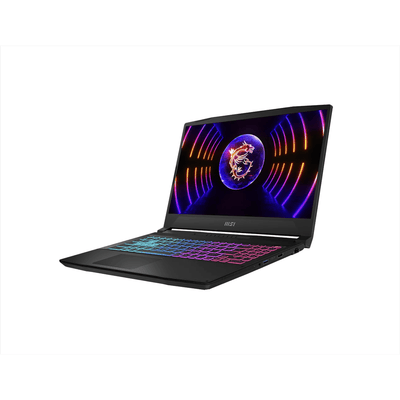
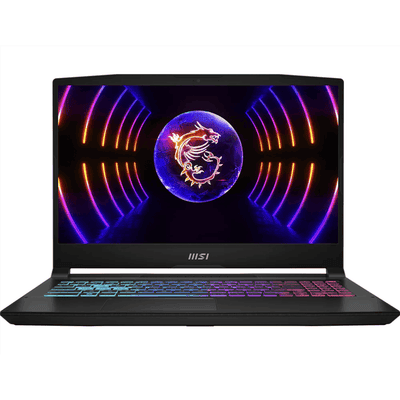
The RoS Golf Simulator Laptop arrives as a dedicated solution for golfers using Uneekor QED or EYE XO systems. Built by Rain Or Shine Golf, it targets users who need reliable performance without configuring a general-purpose gaming laptop. The laptop’s focus on simulator compatibility is evident from the start, though its design and build quality reveal trade-offs common in pre-configured systems.
Unboxing and Build Quality
The laptop ships in a standard retail box with minimal protective padding. Inside, the unit is secured with foam inserts, and accessories include a power adapter and basic documentation. The chassis is plastic with a matte black finish, which resists fingerprints but feels less premium than metal-bodied alternatives. The hinge is sturdy, though the screen wobbles slightly when adjusted, an issue more noticeable than in higher-end gaming laptops.
Key build observations:
- Weight: At 4.85 lbs, it’s heavier than ultraportable laptops but typical for gaming models.
- Keyboard: Full-sized with red backlighting, though key travel is shallow compared to mechanical keyboards.
- Ports: Includes three USB 3.0 ports, HDMI, Mini DisplayPort, and an Ethernet jack, enough for simulator peripherals but lacks USB-C.
The overall construction is functional rather than refined. While it won’t match the durability of business-class laptops, it’s adequate for indoor simulator use where physical stress is minimal.
Portability and Design Features
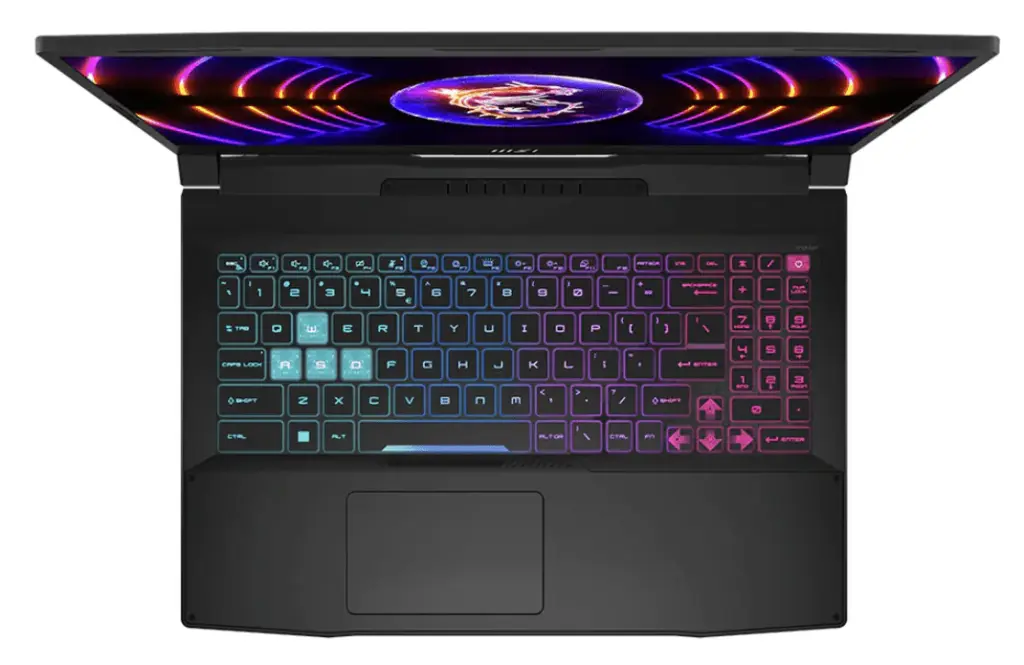
The 15.6-inch form factor balances screen real estate with portability. The thin-bezel display maximizes viewing area, which is useful for simulator software interfaces. However, the laptop’s thickness (0.98 inches) and weight make it less ideal for frequent transport compared to slimmer models.
Design highlights:
- Display: The 144Hz refresh rate and 3ms response time are overkill for golf simulators but improve general Windows navigation.
- Cooling: Dual fans and heat vents keep temperatures stable during extended use, though fan noise becomes noticeable under load.
- Battery: The 4-cell lithium-ion battery provides about 3-4 hours of light use, but simulator sessions will require AC power.
The laptop’s design prioritizes performance over portability. It’s best suited for stationary setups, where its weight and size won’t be a drawback.
Performance and Features
The RoS Golf Simulator Laptop provides hardware built for smooth golf simulation, especially with Uneekor QED and EYE XO systems. We evaluated its components against common performance bottlenecks in simulator setups, focusing on processing power, graphics, and display fluidity. Here’s how each feature performs in real-world use.
Processor and Memory Capabilities
The Intel Core i7-10750H six-core processor (2.6GHz–5.0GHz) runs Uneekor’s software without noticeable lag. Its 12MB cache and 45W TDP balance speed and thermal efficiency, which matters during long practice sessions. The 16GB DDR4 2666MHz RAM meets the minimum requirements for golf simulators, though users running multiple applications may experience slowdowns. Higher-end setups often use 32GB RAM, but this configuration works for dedicated simulator use. For more on component requirements, see our guide to computers for home golf simulators.
NVIDIA GeForce RTX 2070 Graphics Performance
The RTX 2070 GPU doesn’t match the RTX 3060+ standard recommended for modern simulators, but it still delivers playable frame rates for Uneekor’s software. We found it maintained 60+ FPS on medium settings, though high-resolution textures or multi-monitor setups may need adjustments. The 8GB VRAM limits future-proofing, especially as software updates demand more resources. For users prioritizing longevity, a laptop with an RTX 3070 or better would be a stronger choice. Our article on gaming laptops for your golf simulator includes alternatives with newer GPUs.
Display Quality and 144Hz Refresh Rate
The 15.6-inch Full HD (1920 x 1080) display with a 144Hz refresh rate keeps visuals smooth during swings and ball flight. The 3ms response time reduces motion blur, which helps track fast-moving objects like golf balls. While the thin-bezel design maximizes screen space, the 1080p resolution may feel limited compared to 4K options. For simulator use, the higher refresh rate matters more than resolution, as it improves perceived smoothness during gameplay.
Uneekor QED and EYE XO Software Compatibility
The laptop comes pre-configured for Uneekor QED and EYE XO systems, removing setup hassles. Both software packages run without crashes, though EYE XO’s higher camera resolution (1200p vs. QED’s 1080p) benefits from the RTX 2070’s power. Note that Windows 10 Home 64-bit is the installed OS, which may need updates for newer Uneekor software versions. The 512GB NVMe SSD stores core applications, but external drives may be needed for additional courses or data.
Pros and Cons
The RoS Golf Simulator Laptop balances performance and portability for Uneekor QED and EYE XO systems. We evaluated its strengths and limitations based on its hardware specifications and intended use case.
Why the RoS Laptop Excels
The RoS Laptop is built for golf simulation with hardware that meets or exceeds minimum requirements. Key advantages include:
- Processor performance: The Intel Core i7-10750H six-core processor (2.6GHz–5.0GHz) handles real-time swing analysis and 3D rendering without lag. This is critical for Uneekor systems, which rely on high frame rates for accurate ball tracking.
- Display quality: The 15.6″ Full HD 144Hz display ensures smooth visuals, reducing motion blur during fast-paced swings. The 3ms response time and thin bezel design improve immersion, especially in low-light simulator setups.
- Portability: Unlike desktop setups, this laptop allows users to move their simulator system between locations. The 512GB NVMe SSD provides fast boot times and quick access to simulation software, while 16GB of DDR4 RAM supports multitasking without slowdowns.
- Plug-and-play compatibility: Pre-configured for Uneekor QED and EYE XO systems, it eliminates the need for manual driver installations or hardware adjustments. This makes it a convenient choice for users who prioritize ease of setup.
Limitations and Drawbacks
While the RoS Laptop performs well for its intended use, it has trade-offs worth considering:
- Cost efficiency: Laptops typically cost more than desktops with equivalent specs. Users who don’t need portability may find better value in a stationary setup with similar or superior performance.
- Storage capacity: The 512GB SSD may fill quickly if storing multiple simulation software packages or large course libraries. External storage or cloud backups could become necessary over time.
- Upgradability: Unlike desktops, laptops have limited upgrade options. The fixed 16GB RAM and non-replaceable SSD may become outdated as software demands increase.
- Potential compatibility issues: While optimized for Uneekor systems, users with other launch monitors or older software versions may need additional troubleshooting. Rain Or Shine Golf provides support, but this could delay setup for some users.
For golfers who need a dedicated, portable solution for Uneekor QED or EYE XO systems, the RoS Laptop delivers reliable performance. However, those prioritizing long-term flexibility or cost efficiency may prefer a desktop alternative.
Where to Buy and Price
The RoS Golf Simulator Laptop is sold through authorized retailers specializing in golf simulator equipment. The table below lists current options for purchasing this laptop.
Current Pricing and Value Assessment
At $1,750, the RoS Golf Simulator Laptop targets users who need a dedicated machine for Uneekor QED or EYE XO systems. This price reflects the premium for a pre-configured, simulator-ready laptop rather than a general-purpose gaming device. The NVIDIA GeForce RTX 2070 GPU meets the recommended specifications for smooth performance in golf simulation software, while the 16GB RAM and 512GB NVMe SSD provide sufficient capacity for most users.
For comparison, building a desktop with similar specs could cost less, but laptops offer portability and convenience, especially for users with limited space. The 144Hz display is a bonus for those who also use the laptop for gaming outside of simulation. Prices are accurate at the time of writing and are subject to change.
Value depends on your setup needs. If you already own a capable gaming PC, this laptop may not be necessary. However, for those starting from scratch or needing a dedicated, plug-and-play solution, it eliminates the guesswork of hardware compatibility. The included Windows 10 Home license and pre-installed drivers further simplify setup for Uneekor systems.
Alternative Golf Simulator Computers
If the RoS Golf Simulator Laptop doesn’t match your needs, these alternatives offer different balances of power, portability, and price. We focus on systems built for Uneekor QED and EYE XO compatibility, with GPUs that meet or exceed the RTX 3060 baseline.
SurfThing RTX 5080 Build
The SurfThing RTX 5080 Build is a desktop tower designed for high-end golf simulation. It pairs an Intel Core i9-13900K processor with an NVIDIA RTX 5080 GPU, delivering more raw power than the RoS laptop. The system includes 32GB DDR5 RAM and a 1TB NVMe SSD, which handles large course libraries and multi-tasking without slowdowns.
- GPU: RTX 5080 (24GB VRAM), surpasses the RTX 3060 for 4K rendering and ray-traced lighting in simulators like E6 Connect and TGC 2019.
- Cooling: Liquid cooling keeps thermals low during long sessions, reducing fan noise compared to most gaming laptops.
- Expandability: Four M.2 slots and six SATA ports allow for future storage upgrades.
- Portability: Not designed for transport; best suited for permanent simulator setups.
The RTX 5080 Build targets users who prioritize performance over mobility and want a system that won’t need upgrades for years.
Garage Golf Laptop (RTX 470)
The Garage Golf Laptop bridges the gap between the RoS model and high-end desktops. It features an Intel Core i7-12700H processor and an NVIDIA RTX 4070 GPU, which outperforms the RoS laptop’s RTX 3060 in both raw power and efficiency. The 17.3″ 144Hz display provides extra screen real estate for simulator interfaces.
- GPU: RTX 4070 (8GB VRAM), supports DLSS 3 for smoother frame rates at higher resolutions.
- RAM: 32GB DDR5, doubles the RoS laptop’s memory, reducing lag when running background apps like swing analyzers.
- Storage: 1TB NVMe SSD, accommodates larger software installations and swing video recordings.
- Battery Life: Limited to 2-3 hours under load; not ideal for cord-free use.
This laptop suits users who want a portable system with near-desktop performance but don’t need the extreme power of the RTX 5080 Build.
Frequently Asked Questions
Do I need a gaming laptop for golf simulators?
A gaming laptop is recommended for golf simulators like the Uneekor QED and EYE XO systems because they require significant processing power and a dedicated graphics card. The RoS Golf Simulator Laptop, for example, includes an NVIDIA GeForce RTX 2070, which meets the minimum GPU requirements for smooth performance. While some basic simulators may run on standard laptops, high-end systems demand hardware optimized for real-time data processing and graphics rendering.
Laptop vs desktop for golf simulators?
Laptops offer portability and space-saving benefits, making them ideal for home setups where flexibility is important. However, desktops typically provide better performance for the same price, with easier upgrades for future-proofing. The RoS Golf Simulator Laptop balances both needs with its 16GB RAM and RTX 2070 GPU, but users prioritizing raw power or expandability may prefer a desktop. Consider your space, mobility needs, and long-term upgrade plans when deciding.
Can the RoS Laptop run other simulator software?
Yes, the RoS Golf Simulator Laptop is equipped to handle other golf simulator software beyond Uneekor systems, thanks to its Intel Core i7 processor and RTX 2070 GPU. It meets or exceeds the recommended specs for popular platforms like TGC 2019, E6 Connect, and FSX 2020. However, always check the specific requirements of your chosen software to ensure compatibility, especially for newer or more demanding titles.
Is 16GB RAM enough for golf simulators?
16GB RAM is the minimum recommended for most golf simulator setups, including Uneekor QED and EYE XO systems. The RoS Laptop’s 16GB DDR4 RAM is sufficient for smooth operation under typical conditions, but users running multiple applications simultaneously or future-proofing their setup may benefit from upgrading to 32GB. For most home users, however, 16GB provides a good balance between performance and cost.
Final Verdict
The RoS Golf Simulator Laptop is a practical choice for golfers who want a dedicated computer for a golf simulator setup without dealing with component research, driver setup, or compatibility headaches. It is not the most powerful or future-proof option available, but it does the job it was built for: running golf simulator software smoothly in a compact, plug-and-play package.
Its biggest strengths are convenience, portability, and Uneekor-focused compatibility. For users who want a clean setup, limited troubleshooting, and enough performance for reliable simulator sessions, it makes sense. The i7 processor, dedicated NVIDIA graphics, 16GB RAM, and fast SSD give it the core hardware needed for most home golf simulator users.
That said, the RoS laptop is not the best value for everyone. If your simulator will stay in one room permanently, a desktop PC can usually deliver more power, easier upgrades, and better long-term value for the money. The 512GB storage may also feel limiting if you plan to install multiple simulator platforms, course libraries, or save a lot of swing video.
Overall, the RoS Golf Simulator Laptop is best for users who prioritize simplicity over maximum performance. Buy it if you want a ready-to-use laptop that fits neatly into a simulator setup. Skip it if you are comfortable building or buying a desktop with stronger specs, more storage, and better upgrade potential.