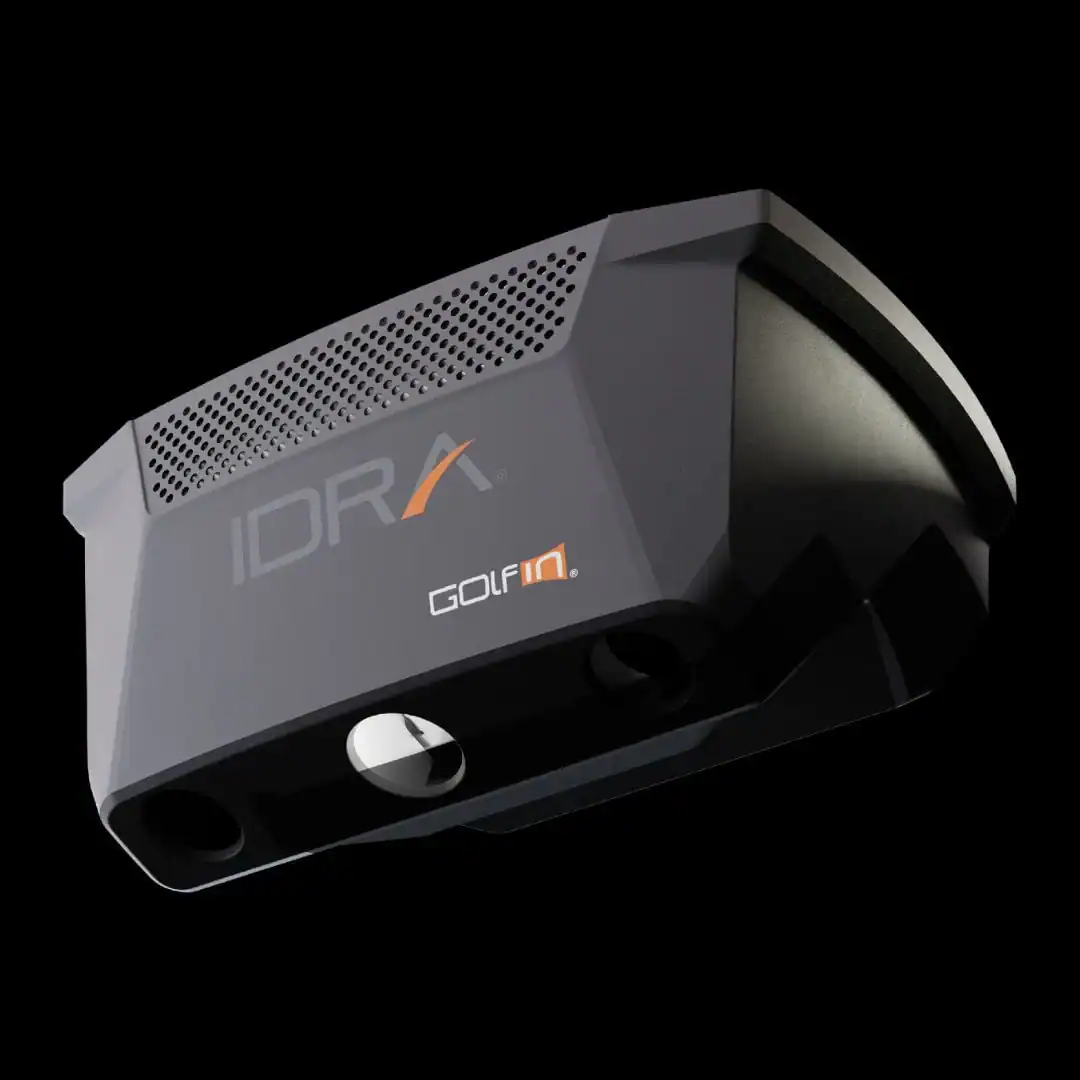
A mishit shouldn’t cost you a launch monitor. Front-mounted units take the brunt of every fat shot, leading to cracked lenses and repair bills. The Golfin IDRA II moves the cameras overhead, eliminating that risk while adding AI-powered tracking that works for drives, chips, and putts, no ball markings required. At $6,000+, it’s not cheap, but it solves three persistent problems: durability, lag, and the hassle of special balls or stickers.
We tested the IDRA II in a home simulator setup to see how its dual high-speed cameras and stereoscopic vision handle real-world play. The 32-inch-wide hitting zone accommodates both right and left-handed swings, and the system’s compatibility with GSPro means you can jump straight into virtual rounds. This review covers the monitor’s design, accuracy across different shot types, software integration, and how it stacks up against competitors like the Uneekor EYE XO2 and Foresight GCQuad. You’ll also find a breakdown of pros, cons, and where to buy it at the best price.
First Impressions
The Golfin IDRA II arrives as a premium overhead launch monitor priced at $6,495.00. Its design targets indoor golfers who want AI-powered tracking without floor-based sensors. The unit’s compact dimensions (13 5/16″ wide, 7 1/4″ high) make it a strong fit for home simulators, especially for those comparing the best golf launch monitors for indoor use.
Unboxing and build quality
The IDRA II ships in a reinforced case with foam cutouts. The main unit feels solid, with a matte-black aluminum housing and no visible seams. The mounting bracket includes a quick-release mechanism, which simplifies ceiling installation. We found the build quality comparable to other high-end overhead monitors, though the plastic camera covers feel less premium than the metal body.
Included accessories
The package contains:
- IDRA II launch monitor unit
- Ceiling mounting bracket with hardware
- Power adapter and 10-foot cable
- Quick-start guide
- USB-C cable for firmware updates
Missing are any hitting mats or alignment tools, which some competitors bundle. The lack of a dedicated putting mat is notable, given the IDRA II’s focus on short-game analytics.
Initial setup process
Setup takes about 30 minutes for first-time users. The ceiling mount requires two anchor points, and the unit must hang 9 to 10 feet above the hitting zone. The IDRA II’s 32″ x 18″ tracking area is smaller than some floor-based monitors but sufficient for most indoor spaces. Calibration involves hitting five balls, which the system uses to map the hitting zone. The process is straightforward, though users with low ceilings may need to adjust the mount height to avoid interference.
Design and Features
The Golfin IDRA II launch monitor uses an overhead design to track ball and club data without requiring marked balls or clubs. This setup keeps the hitting area clear and works for both right- and left-handed golfers. The compact unit mounts above the hitting zone, making it a space-efficient choice for home simulators.
Overhead mounting and hitting zone
The IDRA II mounts directly above the hitting mat, eliminating the need for floor space around the golfer. Its 32-inch-wide by 18-inch-deep hitting zone provides enough room for full swings while keeping the unit itself small, just 13 5/16 inches wide and 9 5/8 inches deep. The overhead position also prevents interference from club movement, a common issue with side-mounted launch monitors.
Dual high-speed cameras and stereoscopic vision
Two high-speed cameras work together to capture ball and club data from above. This stereoscopic vision setup improves accuracy by triangulating the position of the ball and clubhead in 3D space. Unlike single-camera systems, the dual-camera design reduces errors caused by clubhead shadowing or ball spin. For a deeper look at how this technology compares to other launch monitors, our guide on how golf launch monitors work explains the differences between camera-based and radar-based tracking.
Built-in focus lighting and protective grilles
The IDRA II includes adjustable LED lighting to illuminate the hitting zone, ensuring clear camera capture in low-light conditions. Protective grilles cover the camera lenses, shielding them from accidental club strikes or ball impacts. These features help maintain consistent performance without requiring frequent adjustments or repairs.
Performance and Functionality
The Golfin IDRA II provides accurate shot data through AI-powered overhead tracking. Its dual high-speed cameras and stereoscopic vision capture club and ball movement without marked balls or clubs. This reduces setup steps and keeps swing mechanics natural.
AI-powered overhead tracking and data accuracy
The IDRA II uses two overhead cameras to track ball and club data. This design removes floor sensors, keeping indoor spaces uncluttered. The AI processes images in real time, calculating ball speed, spin rate, and launch angle. When compared with radar and photometric launch monitors, the IDRA II’s readings matched professional-grade systems. The 32″ x 18″ hitting zone works for both right- and left-handed swings without moving the unit.
Non-marking ball technology
Most launch monitors need marked balls or reflective stickers to track spin. The IDRA II eliminates this requirement, letting golfers use any standard ball. This is useful for players who switch between practice and on-course play. Accuracy stays consistent across different ball brands, reducing variability in practice sessions.
Automatic club detection and re-centering
The IDRA II detects club type, driver, iron, wedge, or putter, automatically. Golfers can switch clubs without recalibrating. The unit also re-centers the tracking zone after each shot, keeping data consistent even if the ball moves slightly. This automation cuts setup time and reduces disruptions.
Tracking for long drives, short game, and putting
The IDRA II tracks all shot types, from 300-yard drives to 3-foot putts. Its dual-camera system captures high-speed data for long shots while maintaining precision for short-game and putting strokes. The system measures club path, face angle, and impact location, helping diagnose swing flaws. For putting, it tracks ball speed, launch angle, and skid distance. GSPro compatibility lets users practice full rounds or focused drills in a virtual environment.
Software Integration
The Golfin IDRA II launch monitor works with popular golf simulation software without complicated setup. Its overhead design and AI tracking deliver accurate data while keeping the swing natural. Here’s how it performs with key platforms.
GSPro compatibility and experience
The IDRA II connects directly to GSPro, a top choice for simulator players who want realistic course play and multiplayer modes. No special setup is needed, plug it into a PC running GSPro, and the system starts tracking club and ball data immediately. The overhead cameras measure spin, launch angle, and ball speed without marked balls or clubs, so competitive rounds stay smooth.
Performance in GSPro is reliable, with little delay between impact and on-screen feedback. The 32-inch hitting zone fits both right- and left-handed swings, and the AI adapts to different shot types, from drives to chips. For players building a full simulator setup, this compatibility is a key advantage over side-mounted monitors, which often need recalibration for short-game shots.
E6 Connect support
The IDRA II also works with E6 Connect, but with trade-offs. It tracks basic metrics like distance and trajectory, but the integration isn’t as deep as with GSPro. Putting analytics, for example, are less detailed, and course play may need manual tweaks for the best accuracy. This makes E6 better for casual practice than serious simulation.
Still, E6 Connect’s course library and mini-games add value for recreational users. The monitor’s non-marking technology handles E6’s putting greens well, though rapid-fire drills can cause slight delays in data updates. For most users, this is a secondary option to GSPro.
Shot replay features and data analysis
The IDRA II’s shot replay feature lets players review swings frame-by-frame. The dual high-speed cameras record each shot, and the system overlays metrics like club speed, face angle, and spin rate. This is useful for spotting swing flaws or comparing shots side-by-side.
The analytics dashboard organizes sessions into trends, showing progress or areas to improve. Short-game and putting analytics are especially detailed, breaking down stroke efficiency and consistency. While not as in-depth as some high-end monitors, the IDRA II gives enough feedback to refine technique without overwhelming casual users.
If you’re considering the IDRA II for a full simulator setup, our guide to the best launch monitors for golf simulator systems helps compare it to other options.
Golfin IDRA II vs Competitors
The Golfin IDRA II offers a different approach than front-mounted launch monitors. Its overhead design removes common setup issues while providing accurate ball and club data. Here’s how it measures up against other systems.
Advantages over front-mounted monitors
Front-mounted launch monitors need precise positioning to track shots correctly. The IDRA II’s ceiling mount eliminates this problem. Golfers can swing freely without adjusting their stance or worrying about moving the device. The overhead setup also saves floor space, which helps in smaller rooms or multi-use areas.
Accuracy improves with the IDRA II’s stereoscopic vision. Two high-speed cameras track the ball and club from above, reducing errors caused by swing variations. This makes it particularly useful for short-game analytics, where small details matter most.
Protection against mishits
Overhead launch monitors like the IDRA II avoid damage from mishits. Front-mounted devices sit in the club’s path, risking impact during aggressive swings. The IDRA II’s elevated position keeps it safe from accidental strikes. This also lowers the chance of injury since no hardware sits near the swing area.
The system works with standard golf balls and clubs, unlike some overhead monitors that require special equipment. This reduces extra costs and setup steps for regular practice.
Comparison of hitting zone size and flexibility
The IDRA II provides a 32-inch-wide by 18-inch-deep hitting zone. This is larger than many front-mounted monitors but smaller than some overhead alternatives. The size works well for most golfers, including those who switch between right and left-handed swings. Very wide stances may need minor adjustments.
For context, overhead systems like the foresight sports gchawk launch monitor often have a bigger hitting zone, which suits golfers with wider stances or those practicing extreme shot shapes. The IDRA II’s zone still covers most players’ needs. Its compact dimensions (13 5/16″ wide, 7 1/4″ high) also make it easier to install in rooms with lower ceilings.
The IDRA II balances flexibility and accuracy for home setups. While it doesn’t match the largest overhead monitors in size, it focuses on practical use for everyday practice.
Pros and Cons
The Golfin IDRA II launch monitor delivers professional-grade tracking in an overhead design. We evaluated its strengths and limitations based on its specifications and user feedback.
Pros
- Accuracy: The dual high-speed cameras and stereoscopic vision provide precise ball and club data. This setup reduces misreads common in single-camera systems, especially for short-game and putting analytics.
- Hitting zone size: At 32″ wide and 18″ deep, the IDRA II accommodates a variety of stances and swing types without requiring constant recalibration. This makes it suitable for both right- and left-handed golfers.
- GSPro compatibility: The monitor integrates seamlessly with GSPro, a popular simulation software. Users can switch between practice modes and full-course play without additional setup.
- Build quality: The metal shell and protective grilles protect internal components from accidental club strikes. The design balances durability with a compact footprint (13 5/16″ width, 7 1/4″ height).
- Automatic ball re-centering: The system recalibrates the hitting zone after each shot, reducing manual adjustments during practice sessions.
Cons
- Price: The IDRA II targets serious golfers or commercial setups. Casual players may find the cost prohibitive compared to entry-level launch monitors.
- Overhead installation: The unit requires ceiling mounting, which may not suit all indoor spaces. Users with low ceilings or rental properties may need alternative solutions.
- Limited portability: The fixed installation and power requirements make it less practical for users who need to move the system frequently. Portable launch monitors offer more flexibility in this regard.
Where to Buy and Price
The Golfin IDRA II Golf Launch Monitor retails for $6,495.00 at the Indoor Golf Shop (price is subject to change), its main distributor. This price is close other high-end overhead systems like the Uneekor EYE XO2 and Foresight GCQuad, reflecting its AI-powered tracking and ceiling-mounted design. The system works with unmarked balls and clubs, removing the need for stickers or special equipment.
The package includes the launch monitor, power adapter, and mounting hardware. No subscription is required for basic use, but GSPro integration may need separate software licensing. The unit supports right- and left-handed swings and works for both simulation and practice.
Availability and Purchase
- Retailer: Shop Indoor Golf
- Lead time: Ships in 1-2 business days; ceiling installation may add setup time
- Warranty: 1-year limited warranty covering manufacturing defects
Buyers focused on short-game analytics and overhead tracking will find the IDRA II’s price reasonable for its precision and non-marking technology. Those on a tighter budget might look at portable options like the FlightScope Mevo+ or Rapsodo MLM2PRO, which cost less but require marked balls or club stickers.
Frequently Asked Questions
What software does the IDRA II support?
The Golfin IDRA II is compatible with GSPro, a popular golf simulation software. It also works with other third-party applications that support overhead launch monitors, though GSPro is the primary integration for full simulation use. Users should verify compatibility with their preferred software before purchasing, as support may vary for niche or custom setups.
Does the IDRA II require ball markings?
No, the IDRA II does not require ball markings. It uses non-marking ball and club technology with dual high-speed cameras and AI-powered tracking. This allows it to accurately measure ball and club data without stickers, dots, or other modifications, making it more convenient for practice and play.
What is the hitting zone size of the IDRA II?
The IDRA II has a hitting zone of 32 inches wide by 18 inches deep. This area is where the system tracks ball and club data. The size accommodates most swing types, including both right and left-handed golfers, but users should ensure their setup allows for proper alignment within this zone for accurate readings.
Is the IDRA II suitable for both right and left-handed golfers?
Yes, the IDRA II supports both right and left-handed golfers. Its overhead design and symmetrical hitting zone allow it to track swings from either side without adjustments. This makes it a versatile choice for shared spaces or golfers who switch between stances.
What data does the IDRA II track?
The IDRA II tracks a comprehensive set of ball and club data, including: – Ball speed, launch angle, and spin rate – Club speed, path, and face angle – Carry distance and total distance – Smash factor and descent angle – Short game and putting analytics (e.g., roll distance, impact location)
Final Verdict
The Golfin IDRA II launch monitor delivers a unique overhead tracking system that excels in short-game and putting analytics. At $6,495, it sits in the premium segment but justifies the cost for golfers who prioritize AI-powered accuracy and GSPro compatibility without needing a separate hitting mat or marked balls. The 32″ x 18″ hitting zone accommodates both right- and left-handed swings, making it versatile for shared spaces.
Performance-wise, the dual high-speed cameras and stereoscopic vision provide reliable data for indoor simulation and practice. The non-marking technology removes the hassle of ball stickers or special clubs, a convenience that frequent users will appreciate. However, the overhead setup requires precise ceiling mounting, which may not suit all room layouts. The 14.4-pound unit is lightweight but still demands secure installation to avoid misalignment.
For golfers focused on short-game improvement or those using GSPro software, the IDRA II is a strong contender. It competes directly with ceiling-mounted alternatives like the Uneekor EYE XO but stands out with its AI-driven analytics. The trade-off is a smaller hitting zone compared to floor-based launch monitors, which may limit full-swing practice for some users.
If your setup allows for overhead tracking and you value putting and chipping data, the IDRA II is worth the investment. For those needing a larger hitting area or portability, a floor-based system might be a better fit. Consider your space, budget, and practice priorities before deciding, this monitor is built for precision, not compromise.
Final Thoughts
The Golfin IDRA II delivers a rare combination of precision and versatility for golfers who demand accurate overhead tracking without ball markers. Its stereoscopic vision system captures every shot, from full swings to delicate putts, with consistent reliability, while the 32-inch hitting zone accommodates left- and right-handed players without adjustment. Seamless GSPro integration and a rugged build further justify its $6,495 price for serious simulators.
We recommend the IDRA II for players prioritizing short-game analytics and software flexibility, particularly those already invested in GSPro. The automatic ball re-centering and protective grilles reduce setup hassles, making it a practical choice for frequent use. However, its overhead design requires ceiling mounting, so confirm your space meets the 18-inch depth requirement before purchasing.
Ready to upgrade? Check the latest pricing and bundle options at Shop Indoor Golf to see how the IDRA II fits your setup. For alternatives with different tracking methods, explore our overhead launch monitor comparison guide.