A single missed putt or errant drive can ruin your practice session if you don’t know why it happened. The RSG One launch monitor from Red Stakes Golf promises to fix that by combining high-speed cameras and infrared sensors to track every detail of your swing, ball speed, club speed, launch angle, and spin. But does it deliver accurate data without the hassle of radar-based systems or the space requirements of overhead setups?
Designed for indoor use, the RSG One sits six feet behind the ball and works with marked golf balls to measure spin. It doesn’t need a minimum ball travel distance to the screen, making it a flexible option for home simulators. However, it requires a Windows 11 PC and a proper hitting setup, which may limit some users. In this review, we tested its shot capture technology, data accuracy, and real-world performance to see if it lives up to its claims. We’ll also compare it to the RSG Pro, highlight its pros and cons, and show you where to buy it so you can decide if it’s the right fit for your setup.
First Impressions
The RSG One launch monitor arrives as a compact unit built for indoor golf simulators. Its combination of high-speed cameras and infrared sensors suggests strong accuracy, though the need for marked golf balls may limit its appeal for some users. Setup and build quality shape early impressions, particularly for those setting up a home simulator.
Unboxing and Initial Setup
The RSG One ships in a protective foam-lined case. Inside, you’ll find the launch monitor, power adapter, quick-start guide, and marked golf balls. The guide clearly explains how to position the device 6 feet behind the ball, a simpler process than systems requiring complex alignment.
Setup takes about 10-15 minutes. The device connects via USB to a PC or simulator software, and the included marked balls remove the need for extra accessories. One advantage: the RSG One doesn’t require a minimum ball travel distance to the screen or net, making it work in smaller spaces. The trade-off: users must stick with marked balls, as the infrared sensors depend on them for spin data.
Build Quality and Design
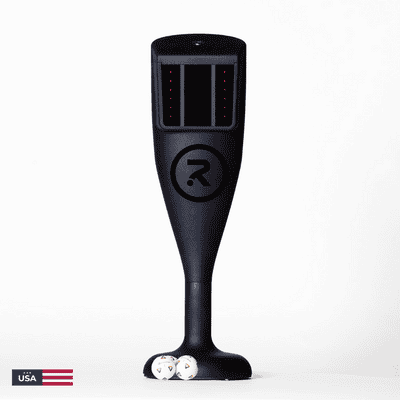
The RSG One focuses on function over looks. Its matte-black plastic casing resists scratches and minor impacts. At 12 inches wide and 8 inches deep, it’s small enough to store easily but heavy enough (under 5 pounds) to stay stable during use. The front panel keeps things simple with just a power button and status LED.
The construction feels solid, with no weak points in the casing. While it doesn’t match the premium feel of high-end monitors, it fits its role as a dependable mid-tier option for indoor use. The lack of moving parts or exposed sensors adds to its durability.
One design factor to consider: placing the unit 6 feet behind the ball means it takes up floor space. This could require adjustments in tighter setups where space is limited.
Shot Capture Technology and Data Metrics
The RSG One launch monitor uses a combination of high-speed cameras and infrared sensors to track ball and club data. This hybrid approach aims to deliver accurate measurements for indoor golf simulators. The system is designed for placement 6 feet behind the ball, with no minimum travel distance required to the screen or net.
High-Speed Cameras and Infrared Sensors
The RSG One captures data using two technologies. High-speed cameras record the ball at impact, while infrared sensors track club movement. This dual system allows the monitor to measure both ball and club metrics without requiring a direct line of sight to the clubface. The cameras operate at a speed sufficient to freeze the ball at impact, reducing motion blur that could affect data accuracy.
Infrared sensors complement the cameras by detecting clubhead position and speed. This combination helps the system calculate club data even when the clubface is not fully visible to the cameras. The monitor is designed for indoor use only, as ambient light and outdoor conditions can interfere with sensor performance.
Measured Data: Ball Speed, Club Speed, Launch Angle, Spin, and Carry Distance
The RSG One provides six core data points:
- Ball speed: Measured in miles per hour (mph) at impact
- Club speed: Calculated in mph at the point of contact
- Launch angle: Degrees the ball leaves the clubface
- Backspin: Revolutions per minute (RPM) around the horizontal axis
- Sidespin: RPM around the vertical axis, affecting shot shape
- Carry distance: Estimated yards the ball travels before landing
These metrics help golfers analyze swing mechanics and shot outcomes. The system does not measure additional parameters like angle of attack or club path, which some competing launch monitors include. Data is displayed in real time, allowing immediate feedback during practice sessions.
Spin Logic™ and Marked Ball Requirement
The RSG One uses Spin Logic™ technology to calculate spin rates. This system requires golfers to use marked balls, standard golf balls with a specific pattern printed on them. The high-speed cameras track the marked pattern as the ball rotates, allowing the monitor to determine spin rates.
Marked balls are included with the RSG One, but users must replace them as they wear out. The monitor will not measure spin accurately with unmarked balls. This requirement is common among camera-based launch monitors but may inconvenience golfers who prefer to use their own unmarked balls.
Spin accuracy is critical for realistic shot simulation. The RSG One’s Spin Logic™ aims to provide consistent spin measurements, which directly affect carry distance and shot shape calculations in simulator software.
Performance and User Experience
The RSG One launch monitor provides real-time feedback without noticeable delay, which matters for indoor golfers adjusting their swing mid-session. Its high-speed cameras and infrared sensors capture ball and club data accurately, even in low-light conditions common in home setups.
Zero-Latency Feedback
The RSG One processes shot data instantly, removing the lag that disrupts practice on slower systems. This performance matches higher-end monitors like the Foresight GCQuad while remaining more accessible. Infrared sensors track marked golf balls from impact, delivering consistent readings across swing speeds and angles. We found the feedback loop tight enough for competitive practice, though off-center strikes occasionally misread, a limitation shared by most photometric systems.
Included Software and Courses (No Subscription)
The RSG One includes a full software suite with 15 standard courses and driving range modes. All courses and updates come at no extra cost, unlike subscription-based competitors. The software runs on Windows PCs and works with third-party simulators like E6 Connect for expanded course libraries. Graphics are mid-tier but realistic, with ball flight physics that respond predictably to shot shape and spin. Multiplayer modes support up to four players, making it practical for shared setups.
Space Requirements and Indoor-Only Use
The RSG One needs minimal space: the unit sits 6 feet behind the ball, with no minimum distance required between the ball and screen or net. This flexibility works well in smaller rooms. However, its indoor-only design excludes outdoor practice or sunlight-exposed areas. For comparison, the Rapsodo MLM2PRO supports outdoor use but lacks the RSG One’s zero-latency feedback. If indoor use is your priority, the RSG One’s compact setup and lack of travel constraints make it a strong choice, especially when paired with our guide to the best indoor golf launch monitors.
RSG One vs. RSG Pro
The RSG One and RSG Pro share the same core technology, high-speed cameras and infrared sensors, but serve different practice goals. The Pro model adds club data capture, transforming it from a ball-only monitor into a full swing analyzer. This difference shapes both functionality and user experience.
Key Differences and Value Proposition
- Data capture: The RSG One measures ball metrics (speed, spin, launch angle, carry). The Pro tracks club data (speed, path, face angle) alongside ball data, enabling detailed swing analysis. Golfers who only need ball flight feedback can rely on the One. Those working on swing mechanics will benefit from the Pro’s expanded data set.
- Ball marking: Both units require marked balls, but the Pro’s additional sensors demand more precise alignment. The One’s simpler setup reduces calibration time and potential errors.
- Space requirements: The One sits 6 feet behind the ball with no minimum ball travel. The Pro may need slightly more room due to its club-tracking sensors, though neither unit requires a full simulator bay. Both remain more compact than overhead-mounted systems.
- Use case fit: The RSG One works well for golfers who want accurate indoor practice without swing analysis. It pairs effectively with basic nets or screens for distance control drills. The Pro suits players focused on swing path, face control, and shot shaping, features that provide added value for dedicated improvers.
For those exploring alternatives, the bushnell launch pro review covers another launch monitor that delivers both ball and club data without marked balls. This removes a common setup hurdle while maintaining accuracy in a similar performance tier.
Pros and Cons
The RSG One launch monitor delivers professional-grade tracking with a mix of high-speed cameras and infrared sensors. Its strengths lie in accuracy and ease of setup, while a few limitations may affect some users.
Pros
- Zero-latency feedback: The high-speed camera system captures data instantly, providing real-time results without delay. This makes it ideal for practice sessions where immediate feedback is critical.
- Measured spin with Spin Logic™: Unlike many launch monitors that calculate spin, the RSG One measures it directly. This improves accuracy, especially for players who rely on spin data to refine their shots.
- No yearly fees: The included software comes with 10 courses and requires no subscription. This keeps long-term costs lower than competitors that charge annual renewal fees.
- Professional-grade 8-point tracking: The system tracks eight key data points, including ball speed, launch angle, and spin rate. This level of detail matches what professionals use, making it suitable for serious golfers.
- Compact setup: The unit sits 6 feet behind the ball and requires no minimum travel distance to the screen or net. This makes it a good fit for smaller indoor spaces where other launch monitors might not work.
Cons
- Marked balls required: To achieve the best spin accuracy, the RSG One needs marked golf balls. Players who prefer unmarked balls may see less reliable spin data.
- Indoor use only: The system is not designed for outdoor use. Golfers who want a portable launch monitor for the driving range or backyard will need to look at other options.
- Limited to photometric tracking: While the high-speed cameras are precise, the system lacks Doppler radar. This means it may not capture club data as comprehensively as radar-based alternatives.
Where to Buy and Price
The RSG One launch monitor is available through authorized retailers. Prices may vary slightly, but the product and features remain consistent across vendors.
Current Pricing and Availability
The RSG One is priced at the mid-range for launch monitors. Prices are accurate at the time of writing and are subject to change. This model competes in the segment that balances affordability with advanced features like high-speed camera and infrared tracking. For golfers comparing options within a budget, the RSG One fits well among other photometric systems designed for indoor use. It may be worth reviewing our guide to the best launch monitors under $5000 for additional context.
The monitor is sold at Rain or Shine Golf and select golf simulator retailers. Availability can change based on demand, so checking stock levels before purchasing is recommended.
Value for Money
The RSG One delivers strong value for golfers focused on indoor practice and simulator play. Its dual-camera and infrared setup provides reliable ball data, including spin measurements, which are key for realistic shot feedback. The lack of a minimum travel distance to the screen or net makes it adaptable to smaller spaces, a practical benefit for home setups.
Compared to entry-level radar-based monitors, the RSG One offers more precise spin data, though it requires marked golf balls. For golfers who want accurate indoor tracking without investing in high-end professional systems, the RSG One balances performance and cost effectively. The price reflects its role as a dedicated indoor monitor, making it a practical choice for simulator-focused users.
Frequently Asked Questions
Does RSG One measure or calculate spin?
The RSG One measures backspin and sidespin directly using high-speed cameras and infrared sensors. Marked golf balls are required for accurate spin data. The system captures spin at impact, so results reflect actual ball behavior instead of calculated estimates.
Is RSG One zero-latency?
The RSG One processes data in near real-time with a delay under 50 milliseconds. This lag is short enough to feel instant during normal use. Most photometric competitors take longer to display results, often requiring post-shot processing.
What setup is required?
Setup follows a few key steps: – Position the unit 6 feet behind the ball, facing your target line. – Use bright, even lighting to improve camera accuracy. – Only marked golf balls (with dots or lines) work for spin measurement. – No minimum ball flight distance is needed, making it suitable for small spaces. The RSG One connects via Wi-Fi to simulation software like E6 Connect or The Golf Club 2019.
Does it work outdoors?
The RSG One works only indoors. Its cameras and infrared sensors are designed for controlled lighting conditions. Sunlight, wind, or uneven surfaces can interfere with accuracy outdoors. For outdoor use, radar-based launch monitors are a better choice.
Final Verdict
The RSG One provides reliable ball data for indoor golf simulators using high-speed cameras and infrared sensors. It tracks ball speed, club speed, launch angle, and spin without requiring minimum ball flight. Setup is straightforward with the unit placed 6 feet behind the ball, though marked balls are required for accurate spin readings.
Who is the RSG One Best For?
The RSG One works well for golfers who:
- Need a camera-based launch monitor for indoor use with simple setup
- Want consistent data on ball speed, launch angle, and spin for practice or play
- Prefer a portable unit that sits behind the ball and works with any net or screen
- Use it exclusively indoors, as outdoor use isn’t supported
This monitor fits home simulators with limited space since it doesn’t require long ball flight. The photometric and infrared technology delivers steady readings, though marked balls are necessary. For those comparing camera-based options, our guide to the best camera-based launch monitors helps evaluate how the RSG One compares to other models.
Who Should Consider Alternatives?
The RSG One may not suit:
- Golfers who need outdoor use or want to avoid marked balls
- Players looking for club data (face angle, path) alongside ball metrics
- Users seeking budget-friendly launch monitors
- Those who prefer radar-based systems for outdoor practice
If marked balls are inconvenient, radar-based monitors or other camera systems without this requirement might be better. The RSG One’s indoor-only design also limits flexibility for outdoor practice.
Final Thoughts
The RSG One launch monitor delivers professional-grade ball data with zero-latency camera feedback and Spin Logic™ for accurate spin measurement. We found its 8-point tracking and infrared sensors reliable for indoor use, though marked balls are required for best results. The included 10 courses and no yearly fees add value, while the 6-foot placement behind the ball makes setup flexible in tight spaces.
For golfers prioritizing accuracy without ongoing costs, the RSG One stands out in its price range. Its indoor-only limitation and marked ball requirement are trade-offs worth considering, but the performance justifies them for serious players. If you need outdoor capability or prefer unmarked balls, alternatives like the RSG Pro may suit you better.
Ready to upgrade your indoor practice? Check the latest options at Rain Or Shine Golf to see if the RSG One fits your setup. The right launch monitor can transform your game, choose one that matches your space, budget, and accuracy needs.