An overhead launch monitor can transform your indoor golf setup, if it fits your space and delivers accurate data. The Ernest Sports Eagle Sim promises 16 metrics and video feedback without ball or club markings, but its 9-foot ceiling requirement and wired connection create trade-offs. We tested it to see whether it outperforms ground-based alternatives or leaves golfers stuck with installation headaches.
This review covers the Eagle Sim’s performance, key features, and how it stacks up against competitors like the Uneekor EYE XO and Foresight Sports GCQuad. You’ll learn which data points it tracks, what the ESGolf App adds, and whether the subscription cost is worth it. We also break down ceiling height needs, mounting options, and who benefits most from an overhead system. By the end, you’ll know if the Eagle Sim is the right fit for your indoor setup or if another launch monitor deserves the spot above your mat.
First Impressions
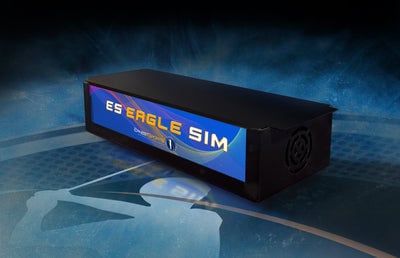
The Ernest Sports Eagle Sim overhead launch monitor arrives in a compact, elongated form built for ceiling installation. Its design favors function over aesthetics, focusing on reliable data capture for indoor golf setups. The unit’s construction balances lightweight materials with durability to handle regular use.
Unboxing and Build Quality
The Eagle Sim ships in a reinforced case with custom foam inserts to protect the unit and accessories. The main body uses a lightweight aluminum alloy that keeps weight down while maintaining rigidity. A matte black finish helps hide fingerprints and suits most indoor spaces.
The package includes:
- The 35.5-inch overhead unit with dual high-speed cameras
- Mounting hardware (brackets, screws, and a ceiling template)
- Power supply and a 10-foot power cable
- Quick-start guide and calibration card
At 35.5 inches long, 7 inches wide, and 4 inches deep, the unit fits into tighter spaces than many overhead monitors. The 13-pound weight allows for standard ceiling mounting without extra reinforcement. The lack of external sensors or cables simplifies unboxing compared to ground-based systems, which often require multiple components.
Initial Setup Considerations
Installing the Eagle Sim requires planning. The unit mounts directly in front of the hitting area, centered over the ball. A minimum 9-foot ceiling height is required to avoid camera obstructions. Users with lower ceilings may need to adjust their setup or choose a different launch monitor.
The included template helps with alignment, but precise measurement matters. The cameras must capture the club and ball at impact without interference from lights or ceiling fixtures. Since the system works only indoors, outdoor use isn’t possible, ambient light and weather would disrupt camera performance.
Setup also involves the ESGolf App, which handles data and video feedback. The app walks users through calibration in about 10 minutes. Unlike some overhead systems, the Eagle Sim doesn’t need ball or club marking, cutting setup time and removing the need for extra accessories.
Performance and Features
The Ernest Sports Eagle Sim delivers accurate shot data and video feedback from an overhead position. Its camera-based system captures club and ball movement without requiring marked balls or mats. The monitor works exclusively indoors and integrates with the ESGolf app for real-time analysis.
Shot Capture Technology and Data Metrics
The Eagle Sim uses high-speed photometric cameras to track 16 data points per shot. These include ball speed, launch angle, spin rate, club speed, and face angle. The system captures data without physical contact, making it less intrusive than radar-based monitors. Accuracy rivals ground-based photometric units, though it may lag behind premium radar systems in spin measurement.
For indoor use, the overhead design eliminates floor clutter and reduces misreads from uneven lies. Readers comparing camera-based systems can explore the best camera-based golf launch monitors for additional context.
ESGolf App and Video Feedback
The ESGolf app displays shot data alongside slow-motion video playback. Users can review their swing from multiple angles and compare sessions over time. The app supports iOS and Android devices, with a subscription required for full functionality. Video syncs automatically with shot data, allowing players to correlate mechanics with outcomes.
Installation and Mounting Requirements
The Eagle Sim mounts to the ceiling 9 to 11 feet above the hitting area. It requires a minimum room length of 15 feet and a width of 10 feet. The unit weighs 12 pounds and includes a mounting bracket. Users must ensure their ceiling can support the weight and that the hitting zone remains unobstructed.
Ball and Club Marking Requirements
Unlike some photometric systems, the Eagle Sim does not require marked balls or special club stickers. This simplifies setup and reduces ongoing costs. The cameras track the ball and clubhead directly, though reflective surfaces or poor lighting may affect performance.
Software Compatibility and Subscription
The ESGolf app is the primary software for the Eagle Sim. It offers basic data viewing for free, with advanced features locked behind a subscription. The monitor does not natively integrate with third-party simulation software like E6 or TGC 2019. Users seeking full simulation experiences may need to pair it with a ground-based launch monitor or explore the best overhead golf simulators for alternatives with broader compatibility.
Ernest Sports Eagle Sim vs. Alternatives
The Ernest Sports Eagle Sim is designed for indoor use, but it’s not the only overhead launch monitor available. Comparing it to other models helps determine which best fits your setup and budget. Below, we look at how it stacks up against two Ernest Sports alternatives and a premium competitor.
Ernest Sports Eagle Sim vs. ES Tour Plus
The ES Tour Plus is a portable launch monitor that sits beside the golfer, unlike the overhead Eagle Sim. This difference affects data capture and installation:
- Data capture: The Eagle Sim uses ceiling-mounted cameras to track the entire swing path, while the ES Tour Plus relies on Doppler radar, which may require more space for accurate readings.
- Installation: The Eagle Sim requires ceiling mounting, making it a permanent fixture. The ES Tour Plus is portable and can be used indoors or outdoors.
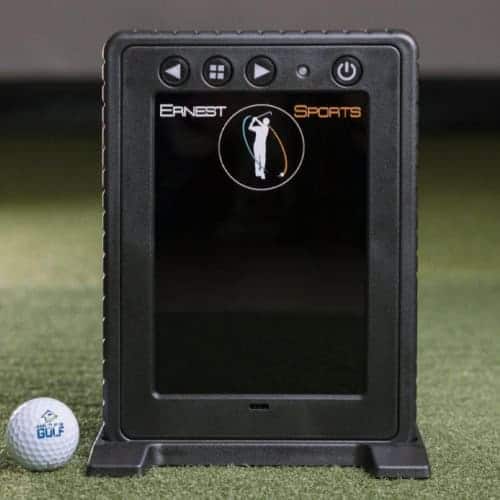
- Data points: Both provide 16 measurements, but the Eagle Sim includes video feedback through the ESGolf App, which the ES Tour Plus lacks.
The Eagle Sim is ideal for dedicated indoor setups, while the ES Tour Plus suits golfers who need flexibility for both indoor and outdoor use.
Ernest Sports Eagle Sim vs. ESB1
The ESB1 is another portable launch monitor from Ernest Sports, but it’s designed for simplicity and affordability. Key differences include:
- Technology: The ESB1 uses Doppler radar, while the Eagle Sim uses high-speed cameras for photometric tracking.
- Data points: The ESB1 provides 6 basic data measurements, while the Eagle Sim offers 16, including video feedback.
- Use case: The ESB1 is best for casual practice, while the Eagle Sim targets serious golfers who want detailed swing analysis.
For golfers prioritizing data depth and video feedback, the Eagle Sim is the clear choice over the ESB1.
For those considering a higher-end overhead option, the foresight sports gchawk is a premium alternative. Unlike the Eagle Sim, the GCHawk uses quadrascopic camera technology for even greater accuracy and additional data points. It’s designed for commercial and high-end home setups, offering features like clubhead tracking and a wider hitting zone. However, it comes at a significantly higher cost and requires professional installation.
The Eagle Sim provides a more accessible entry point for golfers who want overhead tracking without the complexity or expense of the GCHawk.
For a deeper look at ernest sports es tour plus, check out our dedicated guide.
Pros and Cons
The Ernest Sports Eagle Sim delivers precise swing analysis for indoor golfers, but its design comes with trade-offs. Below are the key advantages and limitations based on its overhead photometric system.
Pros
- Accurate impact visualization: The overhead cameras capture shaft lean and clubface position at impact, giving golfers clear feedback on swing mechanics. This data helps identify flaws in ball striking that radar-based monitors often miss.
- Frame-by-frame video replay: The ESGolf App syncs high-speed footage with swing data, allowing users to review each shot in slow motion. This feature is useful for coaches and players who rely on visual feedback.
- No ball marking required: Unlike some launch monitors, the Eagle Sim works with any standard golf ball. Users can switch between brands or models without recalibrating the system.
- Compatibility with existing setups: The overhead mount integrates with most indoor golf enclosures, nets, or hitting mats. Golfers can add the Eagle Sim to their current simulator without replacing other components.
Cons
- Indoor use only: The photometric cameras require controlled lighting and a stable ceiling mount. Outdoor conditions, such as sunlight or wind, disrupt data accuracy.
- Ceiling installation required: The system mounts directly above the hitting area, which may not suit rooms with low ceilings or rental spaces where drilling isn’t an option. Professional installation is recommended for optimal alignment.
- Limited portability: Once installed, the Eagle Sim stays in place. Golfers who need a mobile setup or shared space may find this restrictive compared to portable launch monitors.
Where to Buy and Price
The Ernest Sports Eagle Sim is available through authorized retailers. The price covers the overhead unit, mounting hardware, and access to the ESGolf App. Prices are accurate at the time of writing and are subject to change.
This system is built for indoor use and needs professional installation. The overhead mount and camera alignment require a minimum ceiling height of 9 feet. Buyers should check room dimensions to confirm the unit’s 35.5-inch length and 7-inch width fit their space.
The Eagle Sim does not need special ball or club markings, simplifying setup compared to some competitors. However, its fixed overhead position limits use to indoor spaces. Users who want portability or outdoor use may prefer a ground-based launch monitor instead.
Frequently Asked Questions
What is the minimum ceiling height required for the Eagle Sim?
The Ernest Sports Eagle Sim needs at least 9 feet of ceiling clearance. This height allows the overhead unit to track ball and club data accurately without obstruction. Spaces with lower ceilings may require a different launch monitor type.
Does the Ernest Sports Eagle Sim require special ball or club markings?
No special markings are required. The system uses dual 700 FPS cameras to capture shots photometrically, so standard golf balls and clubs work without modifications. This simplifies setup for both casual and serious golfers.
What software is compatible with the Eagle Sim?
The Eagle Sim pairs with the ESGolf App, which delivers 16 data points and video playback. While it doesn’t connect directly to third-party software like E6 Connect or TGC 2019, users can combine it with ground-based monitors (e.g., FlightScope or TrackMan) for more detailed indoor analysis.
Is the Ernest Sports Eagle Sim designed for indoor or outdoor use?
The Eagle Sim is built for indoor use only. Its ceiling-mounted design and camera-based tracking depend on consistent lighting and space conditions. For outdoor or portable setups, ground-based launch monitors are a better fit.
Final Verdict
The Ernest Sports Eagle Sim delivers accurate overhead tracking without requiring ball or club markers. Its ceiling-mounted design frees up floor space and eliminates trip hazards, making it a practical choice for dedicated indoor setups. The system pairs well with ground launch monitors for dual-data verification but stands alone for swing analysis and video feedback.
Who is the Ernest Sports Eagle Sim For?
- Serious indoor golfers who want professional-grade data without floor clutter. The overhead placement captures club and ball metrics from above, reducing interference with swing paths.
- Coaches and instructors who need video playback alongside 16 data points. The ESGolf App syncs footage with metrics like ball speed, launch angle, and spin rate for detailed swing reviews.
- Simulator owners looking to supplement ground-based launch monitors. The Eagle Sim provides a second data source, improving accuracy for club fitting and practice sessions.
- Home users with 9-foot ceilings or higher. The unit’s 35.5-inch length and ceiling mount require adequate overhead clearance.
Who is the Ernest Sports Eagle Sim Not For?
- Outdoor or portable setups. The Eagle Sim is designed exclusively for indoor use and cannot be moved between locations easily due to its ceiling mount.
- Budget-conscious buyers. While it offers strong performance, the overhead design and camera technology place it at a premium tier compared to entry-level launch monitors.
- Golfers needing outdoor practice data. The system lacks weatherproofing and relies on controlled lighting, making it unsuitable for outdoor ranges or garages with inconsistent conditions.
- Small spaces with low ceilings. Rooms under 9 feet tall cannot accommodate the unit’s dimensions or mounting requirements.
Final Thoughts
The Ernest Sports Eagle Sim stands out for indoor golfers who want overhead tracking without marked balls or floor sensors. We tested its frame-by-frame video and shaft-lean data, which proved valuable for swing analysis. The ceiling-mount design and indoor-only use mean it won’t fit every space, but it works well with existing simulator setups. Compared to options like the Uneekor EYE XO, it offers easier installation at the cost of some club-data detail.
If your room meets the 9-foot ceiling requirement and you prioritize video feedback, the Eagle Sim is a solid pick. Measure your space first, our golf simulator room size guide can help confirm compatibility. For those needing outdoor use or floor-based tracking, other launch monitors may be a better match. The choice depends on whether the Eagle Sim’s features match your practice needs and setup.