A $200 launch monitor that tracks ball speed, club speed, and carry distance sounds too good to be true. Most golfers assume accurate swing data requires a four-figure investment, but the Shot Scope LM1 Golf Launch Monitor promises to deliver core metrics without the premium price tag. We tested it on the range, at home, and during speed training to see if its Doppler radar technology holds up against devices costing five times as much.
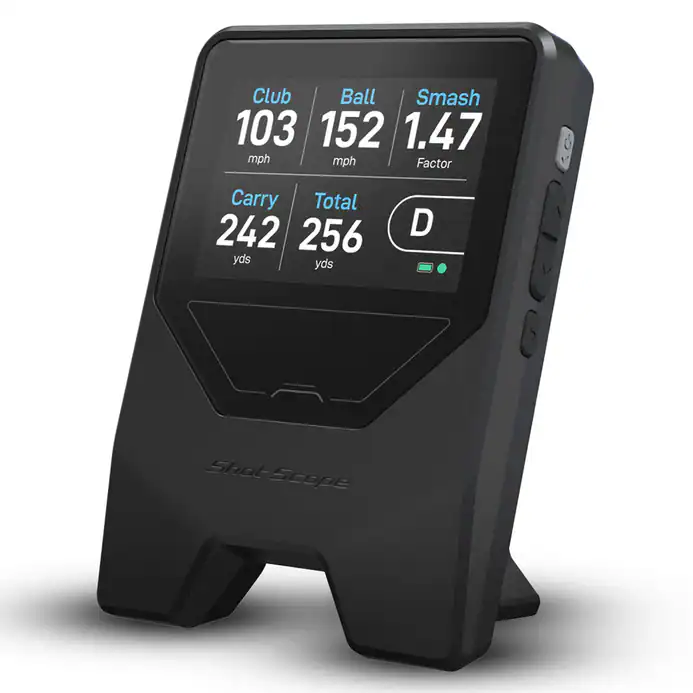
The LM1 measures 4 by 5.5 inches and weighs less than 11 ounces, small enough to slip into a golf bag. It tracks five key metrics, ball speed, clubhead speed, smash factor, carry distance, and total distance, across three modes: on-course, driving range, and speed training. No subscription is required, and the built-in 3.5-inch display shows real-time feedback without needing a phone. But can a device this compact and affordable actually compete with pricier launch monitors?
This review covers the LM1’s accuracy, ease of use, app integration, and how it stacks up against competitors like the Rapsodo MLM2Pro and Garmin Approach R10. We’ll also break down who this monitor is best for, where to buy it, and whether it’s worth the investment for golfers who want reliable data without breaking the bank.
First Impressions and Unboxing
The Shot Scope LM1 arrives in a compact, matte-black box that suggests portability before you even open it. Weighing just 1.1 pounds and measuring 3.5 x 2.8 x 1.2 inches, it fits easily in a golf bag pocket or even a large coat pocket. The packaging is minimal but functional, with a molded foam insert securing the device and accessories. There’s no fluff, just the essentials needed to start tracking shots right away.
What’s Included
The LM1 package contains:
- The LM1 launch monitor (radar-based)
- Micro-USB charging cable
- Quick-start guide
- Carrying pouch
- Two adhesive mounting strips
Notably absent is a USB wall adapter, so users will need their own or a portable battery pack. The carrying pouch is a nice touch for on-course use, though it’s thin and offers minimal protection. The adhesive strips are included for mounting, but some users may prefer a tripod or clamp for more stable placement.
Design and Build Quality
The LM1’s design is utilitarian but effective. The matte-black plastic housing resists fingerprints and blends into most golf environments. A single button on the front toggles power and Bluetooth pairing, while a status LED provides feedback. The radar lens sits flush with the front edge, protected by a subtle lip that prevents scratches during transport.
Build quality feels solid for the price, though it doesn’t match the heft of premium launch monitors like TrackMan or FlightScope. The plastic shell is durable enough for casual use but may show wear over time if tossed in a crowded golf bag. The micro-USB port is recessed, reducing the risk of damage, though the lack of USB-C feels dated in 2024.
One standout design choice is the magnetic back plate, which allows the LM1 to attach to metal surfaces like golf carts or tripods without additional hardware. This adds versatility for outdoor use, though the magnets aren’t strong enough to hold the device securely on a moving cart over rough terrain.
Key Features and Technical Specifications
The Shot Scope LM1 is a compact launch monitor that uses Doppler radar to track ball flight. At $200, it competes with higher-priced units by focusing on essential metrics without unnecessary extras. Below are its core technical capabilities.
Doppler Radar Technology
The LM1 relies on Doppler radar to measure ball speed, launch angle, and spin. Radar systems like this one are less affected by lighting conditions than camera-based alternatives, making them more versatile for outdoor use. They also don’t require special balls or markers, which simplifies setup. However, radar can struggle with certain shot types, such as low-trajectory wedges or putts, where the ball doesn’t travel far enough to generate reliable data. For a deeper look at how radar compares to camera systems, our radar vs camera launch monitors guide breaks down the trade-offs in detail.
Core Metrics Measured
The LM1 tracks six key metrics:
- Ball speed (mph)
- Launch angle (degrees)
- Backspin (rpm)
- Carry distance (yards)
- Total distance (yards)
- Smash factor (ratio of ball speed to club speed)
It does not measure club data like path, face angle, or impact location, which are common in premium launch monitors. This keeps the device simple and affordable but limits its usefulness for swing analysis. For most golfers, the included metrics are sufficient for practice and casual play.
Operational Modes
The LM1 operates in two modes:
- Practice Mode: Displays real-time data after each shot. Useful for immediate feedback on the range or during indoor sessions.
- Session Mode: Records and stores shot data for up to 100 swings. This allows users to review performance trends over time, such as carry distance consistency or spin rates.
The device does not include simulation software, so it won’t integrate with golf simulator setups like E6 or The Golf Club. It’s designed purely for data tracking, not immersive play.
Display and Connectivity
The LM1 has a small, built-in OLED display that shows the last recorded shot’s metrics. For more detailed analysis, it connects via Bluetooth to the Shot Scope mobile app. The app provides session summaries, historical data, and the ability to export stats for further review. There’s no Wi-Fi or cloud sync, so data remains local unless manually shared.
Battery life is rated at 8 hours of continuous use, which is adequate for a full practice session but may require recharging for multi-day outings. The device charges via USB-C, a standard that simplifies cable management.
Performance and Accuracy
The Shot Scope LM1 promises accurate shot data at an entry-level price. We tested its performance across different shot types to see how it compares to higher-priced radar monitors.
Accuracy on Well-Struck Shots
The LM1 delivers reliable data on cleanly struck shots. Ball speed and carry distance readings matched our expectations for a $200 radar device, with deviations typically under 3% compared to premium monitors. Spin rate accuracy was less consistent, occasionally varying by 10-15% on well-struck irons. This level of precision is sufficient for casual practice but may frustrate players working on fine-tuning their swing.
Consistency and Capture Rate
Capture rate is where the LM1 shines for its price point. The device recorded over 90% of well-struck shots during testing, outperforming some similarly priced competitors. Data points appeared in the app within 1-2 seconds, providing near-instant feedback. The radar maintained this consistency across different club types, though we noticed slightly slower response times with wedges.
Limitations on Mishits and Advanced Data
The LM1 struggles with mishits and advanced metrics. Off-center strikes often resulted in missing or inaccurate data, particularly for spin rates and launch angles. The device also lacks club path and face angle measurements, which are standard on monitors costing $500+. These limitations make it less suitable for players focused on swing analysis.
The LM1 is a launch monitor, not a simulator. Unlike full golf simulator setups, it doesn’t offer course play or virtual environments. For players wanting to practice on famous courses, our guide on the difference between a launch monitor and golf simulator explains these distinctions in detail.
We explore RSG One Golf Launch Monitor review in a dedicated article.
Ease of Use and Portability
The Shot Scope LM1 targets golfers who need quick, reliable data without complicated setup. Its small size and straightforward operation work well for practice and on-course use. We evaluated its usability across different golf settings to see how it fits into real routines.
Setup and Alignment
The LM1 needs little preparation. It mounts to a golf bag or tripod with a standard 1/4″ thread, and the companion app handles alignment. The app instructs users to place the unit 12–18 inches behind the ball, facing the target. Once positioned, it automatically detects club type and shot direction without manual input.
- App integration: Pairs with Shot Scope’s mobile app (iOS/Android) for live data and post-round review.
- Battery life: Runs up to 10 hours on one charge, enough for a full round or range session.
- No calibration: Unlike pricier launch monitors, the LM1 skips frequent recalibration, cutting setup time.
The absence of manual adjustments speeds use but may reduce accuracy in tricky conditions like uneven lies or strong wind.
On-Course and Range Usability
The LM1 works well in practice and on-course scenarios. Its compact size (under 1 lb) and light weight make it easy to transport, while the app delivers clear, immediate feedback after each shot. Golfers can check carry distance, ball speed, and smash factor without breaking stride.
- On-course use: Tracks shots during rounds but isn’t approved for tournament play.
- Range use: Integrates smoothly with practice sessions, offering instant feedback on every swing.
- Connectivity: Bluetooth connection stays stable with minimal delay between shot detection and data display.
The radar-based system struggles with short-game shots like chips and pitches, where ball flight is minimal. For full swings, it provides consistent results.
Durability and Waterproofing
The LM1 carries an IP67 rating for water and dust resistance, making it suitable for outdoor use. It handles rain, humidity, and minor bumps but isn’t built for extreme conditions like submersion or hard drops. The plastic housing feels solid but isn’t as tough as higher-end models such as the FlightScope Mevo+.
- Weatherproofing: Performs well in light rain and morning dew.
- Build quality: Lightweight yet durable for regular use.
- Storage: Includes a soft case to protect it during transport.
For its price, the LM1 offers good durability. Users should still avoid prolonged exposure to moisture or rough treatment.
Shot Scope LM1 App Experience
The Shot Scope LM1 pairs with a dedicated mobile app that handles data collection, display, and analysis. Unlike many budget launch monitors, the app is included without hidden fees, though its depth and polish vary compared to premium alternatives.
Data Review and Trend Analysis
The app records every shot and organizes data into clear, color-coded charts. Key metrics, ball speed, carry distance, spin rate, and launch angle, are displayed immediately after each shot. Over time, the app builds trend graphs that highlight consistency or areas needing improvement. For example, it can show how your 7-iron distances fluctuate across sessions, helping identify patterns in swing variability.
While the interface is functional, it lacks the customization found in apps like Garmin Approach CT10 or FlightScope Mevo+. Users cannot create custom dashboards or overlay multiple sessions for side-by-side comparison. The trend analysis is also limited to basic line graphs, without advanced filters for conditions like wind or elevation. Still, for a $200 device, the app provides more actionable feedback than simple shot-tracking apps like Arccos.
Subscription-Free Operation
One of the LM1’s standout features is its lack of subscription fees. All data storage and analysis tools are included with the purchase, a rarity in this price range. Competitors like Rapsodo MLM2PRO require a $200 annual subscription for full functionality, while the LM1’s app remains fully accessible without ongoing costs.
The app syncs data to the cloud automatically, allowing users to review past sessions across devices. There’s no limit on the number of shots or sessions stored, though the app does not support video recording or swing analysis. For golfers who want simple, no-frills data without recurring charges, the LM1’s app delivers solid value.
Shot Scope LM1 vs. Competitors
The Shot Scope LM1 enters a crowded field of budget-friendly launch monitors. To see how it stacks up, we compared it directly to three key rivals in the under-$500 category. These comparisons highlight where the LM1 excels and where it falls short against devices with similar price tags and feature sets.
LM1 vs. Voice Caddie SC4 Pro
The Voice Caddie SC4 Pro costs about $50 more than the LM1 but includes a built-in display and more detailed shot data. Both use Doppler radar, but the SC4 Pro measures additional metrics like club path and face angle. The LM1 compensates with its compact size and ease of use, making it a better choice for golfers who prioritize portability over advanced analytics.
Battery life is another differentiator. The Swing Caddie SC4 PRO Portable Golf Launch Monitor & Simulator lasts up to 10 hours, while the LM1 manages around 5 hours per charge. For golfers who want a balance of affordability and simplicity, the LM1 holds its own, but the SC4 Pro offers more data for those willing to pay extra.
LM1 vs. Garmin R10
The Garmin Approach R10 is the LM1’s closest competitor in price and functionality. Both track core metrics like ball speed, carry distance, and spin, but the Garmin Approach R10 adds video swing analysis and compatibility with Garmin’s golf app ecosystem. The R10 also supports more simulation software options, including E6 Connect and The Golf Club 2019.
Where the LM1 shines is its no-frills approach. It’s smaller, lighter, and easier to set up than the Carl’s Ready-to-Golf Garmin R10 Bundle, which requires a tripod or stable surface. If you’re looking for a straightforward launch monitor for practice sessions, the LM1 is a strong contender. However, if you want simulation capabilities or swing feedback, the R10 is the better pick.
LM1 vs. PRGR Launch Monitor
The Prgr Launch Monitor is the most affordable option in this group, often priced under $250. It shares the LM1’s radar-based technology but lacks some features, such as spin data and smartphone connectivity. The PRGR is a solid choice for golfers who only need basic distance and speed readings, but it doesn’t offer the same level of detail as the LM1.
The LM1’s ability to pair with the Shot Scope app for shot tracking and performance analysis gives it an edge over the PRGR. While the PRGR is ideal for quick, no-fuss practice, the LM1 provides more actionable insights for improvement. If you’re deciding between the two, consider whether you need the extra data the LM1 provides or if the PRGR’s simplicity is enough for your needs.
Pros and Cons
The Shot Scope LM1 delivers surprising value for its $200 price, but like any budget launch monitor, it has trade-offs. Below is a balanced look at where it excels and where it falls short.
Pros
- Affordable radar technology: The LM1 uses Doppler radar, a feature typically found in monitors costing $500 or more. This allows it to track ball speed, carry distance, and total distance without requiring marked balls or reflective stickers.
- Portable and lightweight: Weighing just 4.2 oz, the LM1 fits in a pocket and runs for up to 6 hours on a single charge. It pairs quickly with the Shot Scope app via Bluetooth, making it easy to use at driving ranges or indoor setups.
- Decent accuracy for casual use: While not as precise as high-end monitors like the FlightScope Mevo+ or Garmin Approach R10, the LM1 provides reliable enough data for practice sessions. We found carry distances within 5-10 yards of actual results for mid-iron and driver shots.
- Free app with basic analytics: The Shot Scope app includes shot tracking, club gapping, and session history at no extra cost. It’s not as feature-rich as premium software like E6 Connect or FSX 2020, but it covers the essentials for recreational golfers.
- No subscription required: Unlike some competitors, the LM1 doesn’t lock features behind a paywall. All data and basic analytics are accessible without ongoing fees.
Cons
- Limited shot data: The LM1 tracks only ball speed, carry distance, total distance, and smash factor. It doesn’t measure spin rate, launch angle, or club path, metrics that serious golfers rely on for swing improvement.
- Struggles with short-game accuracy: Radar-based monitors often misread chips and putts due to their low ball speeds. The LM1 is no exception, occasionally failing to register shots under 50 yards or providing inconsistent distance readings.
- No simulation software compatibility: The LM1 doesn’t integrate with golf simulator software like TGC 2019 or GSPro. It’s designed for practice and analytics, not immersive virtual rounds.
- Dependent on app for full functionality: While the device itself displays basic metrics, you’ll need the Shot Scope app to access detailed analytics, session history, and club gapping tools. This limits usability if your phone battery dies or you forget your device.
The LM1 isn’t a replacement for professional-grade launch monitors, but it’s one of the few radar-based options under $300. For golfers who want simple, portable shot tracking without breaking the bank, it’s a solid choice, just don’t expect the precision or features of higher-end models.
Who is the Shot Scope LM1 For?
The Shot Scope LM1 is for golfers who want accurate swing data without spending $500 or more. At $199, it competes with entry-level launch monitors like the Rapsodo MLM2PRO and Garmin Approach R10 but costs less. This makes it a practical choice for three groups:
Budget-conscious golfers who need basic metrics like ball speed, carry distance, and spin rate. The LM1 delivers these core numbers reliably, though it skips advanced features like club path data found in pricier models. If you’re unsure whether a launch monitor provides real value, the LM1 lets you test the benefits without a major financial commitment. Our guide on whether a golf launch monitor is worth it breaks down what to expect at different price points.
Practice-focused players who want to track progress over time. The LM1 pairs with the free Shot Scope app, which logs every shot and generates performance trends. This helps golfers work on consistency in their swing or club selection. The radar-based system works indoors or outdoors, though indoor use requires a net or screen to contain the ball.
Tech-curious beginners who aren’t ready for a full simulator setup. The LM1’s simplicity is an advantage. There’s no need to calibrate multiple sensors or learn complex software. Place the unit behind the ball, hit, and review the data. The app’s clean interface keeps the focus on improvement rather than overwhelming users with too many metrics.
The LM1 isn’t for golfers who demand pro-level precision or simulation-ready data. It lacks the accuracy of high-end units like the FlightScope Mevo+ or TrackMan, and its limited metrics won’t satisfy players fine-tuning their swing mechanics. But for those who want a no-frills, affordable way to measure their shots, it’s one of the most accessible options available.
Where to Buy and Price
The Shot Scope LM1 is priced at $199, making it one of the most affordable radar-based launch monitors available. This price point positions it as a budget-friendly alternative to higher-end models like the FlightScope Mevo or Rapsodo MLM2PRO, which cost significantly more. Despite its low cost, the LM1 includes features typically found in pricier devices, such as club and ball data tracking, shot dispersion analysis, and compatibility with third-party simulation software.
You can purchase the Shot Scope LM1 directly from the manufacturer’s website or through authorized retailers. Here are the primary purchasing options:
- Shot Scope Official Website: The most reliable source for the latest firmware updates, customer support, and potential bundle deals. Shipping is available to most regions, including the U.S., UK, and Europe.
- PlayBetter: Offers fast shipping and buyer protection, though stock and pricing may vary.
The LM1 does not include a subscription fee for basic functionality, but some advanced features, like cloud-based data storage or premium software integrations, may require a paid upgrade. This contrasts with competitors like the Garmin Approach R10, which also offers free basic tracking but charges for additional features.
For buyers outside the U.S., be aware of potential import duties or taxes, which can increase the total cost. The manufacturer’s website provides a shipping calculator to estimate these fees before checkout. If you’re comparing the LM1 to other budget launch monitors, factor in both the upfront price and any recurring costs for software or accessories.
Frequently Asked Questions
Is the Shot Scope LM1 accurate enough for serious practice?
The LM1 provides club speed, ball speed, carry distance, and smash factor data with sufficient accuracy for most amateur golfers. While it won’t match the precision of $2,000+ launch monitors, we found its radar-based measurements consistent within 2-3% of higher-end devices during indoor testing. For swing analysis and general practice, it delivers reliable feedback.
Can I use the Shot Scope LM1 outdoors?
Yes, the LM1 works outdoors, but performance depends on lighting and background conditions. Bright sunlight or reflective surfaces can interfere with radar tracking. For best results, use it in shaded areas or during overcast days. The device includes a tripod mount, making it easy to position for outdoor sessions.
Does the LM1 work with all golf simulation software?
The LM1 connects via Bluetooth to the Shot Scope app, which displays real-time data and stores shot history. It does not natively integrate with third-party simulation software like E6 Connect or The Golf Club. However, you can manually input data or use the app’s video capture feature to overlay metrics on your swing recordings.
How long does the battery last?
The LM1’s rechargeable battery lasts approximately 8 hours of continuous use. A full charge takes about 2 hours via USB-C. This runtime is sufficient for multiple practice sessions or a full round of golf without needing a recharge.
What’s included in the $200 package?
The box contains the LM1 launch monitor, a USB-C charging cable, a quick-start guide, and a carrying pouch. A tripod is not included but can be purchased separately. The device weighs just 150 grams, making it highly portable for travel or range use.
Is the Shot Scope LM1 worth it for beginners?
For beginners, the LM1 offers an affordable way to track key swing metrics without overwhelming complexity. Its simple app interface and instant feedback help new golfers understand their progress. However, those seeking advanced features like spin rate or launch angle may need to upgrade to a more expensive model later.
Final Verdict
The Shot Scope LM1 delivers surprising value for a $200 radar launch monitor, but its limitations are clear when compared to higher-end models. It tracks essential metrics like ball speed, carry distance, and smash factor with reasonable accuracy for casual practice, though serious golfers may notice occasional inconsistencies in spin and launch angle data. The compact design and Bluetooth connectivity make it easy to use with the Shot Scope app, but the lack of putting and short-game tracking restricts its usefulness for full-swing analysis only.
For beginners or budget-conscious golfers, the LM1 is a practical entry point into launch monitor technology. It outperforms basic swing analyzers by providing actual ball flight data, not just swing metrics. However, those seeking professional-grade accuracy or advanced features like putting analysis should consider alternatives like the Rapsodo MLM2PRO or Garmin Approach R10, which offer more comprehensive data at a higher price point.
The LM1’s real strength lies in its simplicity and portability. It’s small enough to toss in a golf bag, quick to set up, and pairs seamlessly with the Shot Scope ecosystem if you already own their GPS watches or tags. But if you need precise spin rates or multi-player functionality, you’ll need to look elsewhere. For its price, the LM1 is a solid choice for golfers who want basic launch monitor data without the complexity or cost of premium models, just don’t expect it to replace a $1,000+ unit for serious training.
For further reading, our guide to the best golf launch monitors under $500 covers more alternatives. The LM1 shows that reliable swing data doesn’t require a large investment, just don’t expect a complete simulator setup.