October 22, 2026 update: this review now notes that the Mevo+ has been replaced by the Mevo Gen2, which also uses Fusion Tracking and supports the same add-ons, and the outdated price has been removed.
You want pro-level swing data without anchoring yourself to a single room. The FlightScope Mevo+ promises that freedom, portable, radar-powered, and packed with 20+ metrics. But does it deliver, or does the 16-foot space requirement and finicky setup turn flexibility into frustration?
We tested the Mevo+ indoors and out, tracking everything from ball speed to spin axis. It records data reliably, pairs with E6 Connect for simulation, and fits in a backpack. Yet the alignment process eats time, and the Pro Package upgrades push the cost higher than expected. This review breaks down performance, compares it to competitors like Garmin Approach R10, and flags the hidden space and budget hurdles. You’ll see where the Mevo+ shines, where it stumbles, and whether it’s the right tool for your garage, basement, or backyard practice sessions.
First Impressions
The FlightScope Mevo+ arrives as a compact solution for golfers who want swing and ball flight data without a permanent setup. It has since been replaced by the FlightScope Mevo Gen2 and is now sold as remaining stock. Its design balances portability with professional-grade tracking, making it a practical choice for both indoor and outdoor use. The initial experience focuses on simplicity, though setup requires attention to space and alignment.
Unboxing and Initial Setup
The Mevo+ ships in a sturdy carrying case that holds the launch monitor, charging cable, metallic dots for indoor use, and a quick-start guide. Unboxing is straightforward, but setup demands precision. The device needs 16 feet of total space (8 feet behind the ball, 8 feet in front) to track full shots accurately. For indoor use, the metallic dots must be placed on the ball to ensure the high-speed camera captures spin data.
Pairing with the FlightScope app takes minutes on iOS or Android. The app walks users through calibration, which involves placing the Mevo+ at a specific distance from the hitting mat. While the process is user-friendly, first-time users may need to adjust the device’s position to avoid misreads. The included E6 Connect software (12 courses) loads automatically once the app is synced, offering immediate simulation options.
Build Quality and Design
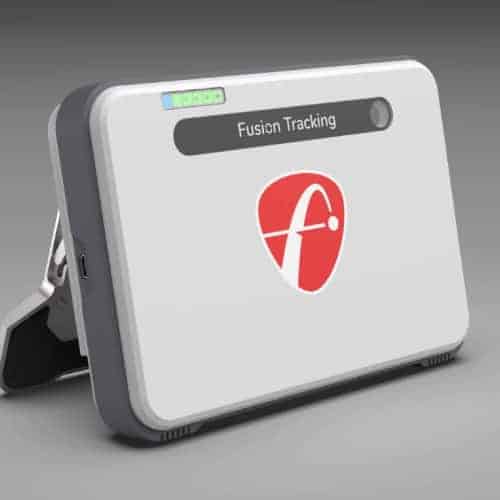
The Mevo+ measures 6.8 x 3.5 x 2.5 inches and weighs just over 1 pound, making it easy to transport. The matte-black plastic housing feels durable, though it’s not weatherproof for extended outdoor use in rain. A rubberized base prevents sliding during operation, and the front-facing camera and radar sensors are protected by a clear plastic window.
The device’s simplicity extends to its controls. A single power button and status LED are the only physical inputs. The LED flashes green when tracking is active and red if alignment is off. While the minimalist design avoids clutter, users must rely on the app for detailed feedback, which may feel limiting for those accustomed to built-in displays on higher-end monitors.
Build quality is solid for a portable unit, but the plastic construction doesn’t match the premium feel of stationary launch monitors. The trade-off is clear: the Mevo+ prioritizes flexibility over ruggedness, catering to golfers who value mobility.
Performance and Features
The FlightScope Mevo+ provides swing and ball flight data using Fusion Tracking Technology. It balances portability with professional-grade metrics, making it useful for both indoor and outdoor practice. Below, we examine its core features and how they meet different training needs.
Fusion Tracking Technology Explained
Fusion Tracking combines 3D Doppler radar with image processing to capture club and ball data. The radar tracks ball flight, while a built-in camera refines spin and launch angle measurements. This hybrid system improves accuracy over single-technology monitors, especially indoors where radar alone may struggle with spin detection. The Mevo+ processes data in real time, displaying results on connected devices within seconds.
Data Parameters and Accuracy (Ball & Club Data)
The Mevo+ measures over 20 data parameters, including ball speed, club speed, smash factor, carry distance, and spin rate. Club data covers face angle, path, and angle of attack. Accuracy compares well to monitors costing significantly more, though spin consistency trails high-end units. For amateur golfers, the data is sufficient for swing analysis and skill improvement. The system also records video with data overlays for side-by-side swing comparisons.
Indoor and Outdoor Capabilities
The Mevo+ works in both environments but has different space requirements. Outdoors, it tracks full ball flight without restrictions. Indoors, it needs at least 8 feet of ball flight to capture reliable data, which can limit use in tight spaces. Accuracy indoors improves when hitting into a net or screen, as the camera compensates for radar limitations. For a detailed look at performance differences, our guide on flightscope indoors vs outdoors accuracy provides evidence-based comparisons across setups.
Included Software and Subscription (E6 Connect)
The Mevo+ includes E6 Connect, offering 12 virtual courses and practice ranges. The software runs on iOS, Android, and PC, syncing with the launch monitor via Bluetooth. No subscription is required to access the included content, though additional courses and features are available through in-app purchases. The interface is intuitive, with customizable data displays and video playback options.
Optional Upgrades: Pro Package and Face Impact Location
Two upgrades expand the Mevo+’s capabilities, and since November 2025 the Mevo Gen2 supports both as well. The Pro Package adds 11 advanced metrics, including dynamic loft, spin loft, and descent angle. Face Impact Location uses the camera to show where the ball struck the clubface, helping diagnose mishits. Both upgrades are one-time purchases with no ongoing fees.
Compatibility and App Experience
The Mevo+ pairs with the FlightScope app for real-time data and video analysis. The app supports swing comparisons, session history, and data export. It also integrates with third-party software like The Golf Club 2019 and Creative Golf 3D. Setup is simple: position the unit 7 feet behind the ball, connect via Bluetooth, and start hitting. The app guides users through calibration for accurate readings from the first swing.
Space Requirements and Setup Challenges
The FlightScope Mevo+ offers portability but still needs careful planning for space and setup. Unlike fixed simulator systems, it works in smaller areas but requires specific clearances for accurate tracking. Here’s what to consider before installation.
Minimum Space Needed
The Mevo+ needs 16 feet of total space for reliable indoor use. This includes:
- 8 feet from the ball to the device (positioned behind the golfer)
- 8 feet of ball flight (from impact to landing)
A minimum ceiling height of 8 feet is recommended to avoid restricting full swings. In tighter spaces, accuracy may decrease, especially with drivers. Outdoor use removes these constraints since open-air setups eliminate ceiling and side-wall interference.
For home setups, measure your room’s dimensions first. The Mevo+ fits most garages or basements but may not work well in rooms shorter than 12 feet. If space is limited, foam balls or shorter clubs can help reduce swing requirements.
Alignment Process
Accurate alignment ensures the Mevo+’s Fusion Tracking Technology works correctly. Follow these steps:
- Device Placement: Set the Mevo+ on a tripod or flat surface 6–8 feet behind the ball, centered on the target line. The camera must have an unobstructed view of the hitting area.
- Leveling: Use the built-in bubble level to confirm the unit is flat. Uneven surfaces can affect radar accuracy.
- Target Line: Point the Mevo+ directly down the intended target line. Even slight misalignment can distort ball flight data.
- Calibration: Open the companion app and complete the on-screen calibration. This step syncs the radar and camera for precise tracking.
The Mevo+ includes a quick-start guide with diagrams, but first-time users typically spend 10–15 minutes on alignment. Unlike fixed systems, the Mevo+ requires realignment if moved, which can slow down frequent relocations. Outdoor setups are easier to calibrate since natural light improves camera tracking.
FlightScope Mevo+ vs. Competitors
The Mevo+ offers a portable, data-driven solution for golfers, but how does it compare to other launch monitors? Below, we look at two direct competitors: the Foresight Sports GC3 and the FlightScope Mevo Gen2. Each targets different needs, precision, mobility, or cost, so the best option depends on your setup and goals.
Mevo+ vs. Foresight Sports GC3
The Foresight Sports GC3 is a high-end launch monitor that uses photometric tracking with high-speed cameras to capture club and ball data. Unlike the Mevo+, which uses Fusion Tracking (radar + camera), the GC3 does not need reflective dots on the ball for indoor sessions, making setup easier. However, the GC3 is bulkier, less portable, and typically more expensive, which makes it a better fit for fixed simulator installations rather than travel or outdoor use.
The Mevo+ stands out for versatility. It works indoors and outdoors without extra accessories, and its 20+ data points, including club path, face angle, and spin rate, match the GC3’s output. The Mevo+ also comes with E6 Connect software (12 courses), while the GC3 requires a separate purchase for simulation software. For golfers who value mobility and affordability, the Mevo+ is the better option. Those who need lab-level accuracy and plan to use the device mostly indoors may prefer the GC3.
Mevo+ vs. FlightScope Mevo Gen2
The Mevo Gen2 is the newer model that replaced the Mevo+, which is now discontinued. Both use Fusion Tracking Technology, combining 3D Doppler radar and a high-speed camera. The Gen2 runs up to about 6 hours on a charge versus about 3 hours for the Mevo+, and the two share the same add-ons.
Software is one difference: the Mevo+ includes E6 Connect with 12 courses, while the Gen2 includes 8. Since the Gen2 replaced the Mevo+ and now takes the same Pro Package and Face Impact Location add-ons, it is the better starting point for most golfers. The Mevo+ only makes sense if you find one at a closeout price or want the extra courses. If you’re comparing the Mevo Gen2 vs Mevo Plus, check the current price of each before you decide.
For a wider view, the Mevo+ also competes with the SkyTrak+, which provides advanced simulation features at a higher cost. The SkyTrak+ vs Mevo Plus decision often comes down to whether you want realistic course play (SkyTrak+) or portable swing analysis (Mevo+).
Pros and Cons
The FlightScope Mevo+ delivers professional-grade data in a portable package, but its space requirements and optional upgrades add trade-offs. Here’s what stands out.
Pros
- Accuracy: The Mevo+ tracks over 20 data parameters with precision that rivals high-end launch monitors. Ball flight and clubhead metrics remain consistent for practice and play.
- Portability: Its compact size and battery-powered operation allow use indoors or outdoors on real grass. No permanent setup is required.
- Software included: The bundled E6 Connect software provides 12 courses without requiring an annual subscription for core features.
- Compatibility: Works with most simulator software and integrates with third-party apps for swing analysis and game improvement.
Cons
- Space requirements: A minimum of 16 feet of ball flight is needed, which excludes small rooms or apartments. Users with limited space may need to adjust expectations or use a net.
- Setup time: Alignment and calibration take longer than expected, especially for first-time users. The process improves with practice but remains a hurdle for quick sessions.
- Upgrade costs: The Pro Package and Face Impact upgrades add expense. While not mandatory, they unlock features that some competitors include by default.
The Mevo+ balances performance and flexibility, but its limitations may frustrate users with tight spaces or strict budgets.
Where to Buy and Price
The FlightScope Mevo+ is discontinued and sold as remaining or closeout stock, so its price varies by retailer. Prices change often, so check the current listing. At a closeout price it can still be one of the more affordable portable launch monitors that provides professional-grade swing and ball flight data.
The Mevo+ includes a 12-course E6 Connect software bundle at no extra charge, which adds value for golfers who want simulation without subscription fees. Optional upgrades, such as additional software courses or third-party integrations, can expand its functionality. For a full comparison of FlightScope’s pricing across its lineup, our flightscope price guide covers the Mevo, Mevo+, Gen2, and X3 models.
You can buy the FlightScope Mevo+ from authorized retailers that specialize in golf simulation equipment. Availability may vary by region, so check with local or online stores that carry launch monitors. The device works both indoors and outdoors, making it a flexible option for home simulators or range practice.
Before purchasing, verify the space requirements, 16 feet of depth is needed for accurate tracking. The Mevo+ works with iOS, Android, and PC, so confirm your setup matches these requirements. If you’re unsure whether this model suits your needs, review the key specs and use cases to decide.
Frequently Asked Questions
How accurate is the FlightScope Mevo+ compared to professional monitors?
The FlightScope Mevo+ uses Fusion Tracking Technology, combining 3D Doppler radar and a high-speed camera to deliver accuracy close to professional-grade launch monitors. While it doesn’t match the precision of systems like TrackMan or FlightScope’s X3, it provides reliable data for swing analysis and ball flight tracking. Amateur golfers and coaches find its 20+ data parameters sufficient for practice and improvement.
Can I use the Mevo+ outdoors?
Yes, the Mevo+ is designed for both indoor and outdoor use. Its portable design and battery-powered operation make it ideal for practicing off real grass or at driving ranges. For best results, ensure a clear line of sight between the monitor and the hitting zone, and avoid direct sunlight on the camera lens during outdoor sessions.
What is included with the Mevo+?
The standard Mevo+ package includes: – The Mevo+ launch monitor unit – USB-C charging cable and power adapter – Carry case – E6 Connect software license (12 courses) – Quick-start guide and calibration tools
How much space do I need for the Mevo+?
The Mevo+ requires a minimum of 16 feet of total space: 8 feet from the hitting position to the monitor and 8 feet for ball flight. For indoor use, this includes ceiling height to accommodate full swings. Outdoor setups need a clear, unobstructed area of the same dimensions.
What is the Pro Package and is it worth it?
The Pro Package is an optional one-time add-on that unlocks advanced club data such as club path, face angle and dynamic loft. It works with the Mevo+ and, since November 2025, with the Mevo Gen2. It’s worth considering if you want that extra swing detail. For casual users, the base package provides all essential features without the added cost.
Is there a subscription fee for the Mevo+?
No, the Mevo+ does not require a subscription for its core functionality. The included E6 Connect software provides access to 12 courses without recurring fees. Optional software upgrades or additional course packs may require separate purchases, but these are not mandatory for basic use.
Final Verdict: Is the Mevo+ Right for You?
The FlightScope Mevo+ delivers professional-grade swing and ball flight data in a portable package. It suits golfers who want flexibility without sacrificing accuracy, but it isn’t a one-size-fits-all solution. Here’s who will benefit most, and who should look elsewhere.
Who is it for?
The Mevo+ works well for three key groups:
- Amateur golfers upgrading from basic launch monitors. The 20+ data parameters (including club speed, spin rate, and carry distance) provide the detail needed to diagnose swing flaws. Unlike entry-level devices, it tracks both ball and club data, giving a complete picture of each shot.
- Golfers who practice in multiple locations. At 16 feet long, the setup fits in garages, basements, or even backyards. The included E6 Connect software lets you play virtual rounds indoors, while outdoor use lets you practice off real grass. No subscription is required for core functionality.
- Tech-savvy players who want software flexibility. The Mevo+ pairs with iOS, Android, and PC, and supports third-party apps like The Golf Club 2019. This makes it adaptable for training, simulation, or entertainment.
Who is it not for?
The Mevo+ has limitations that may rule it out for some:
- Golfers with tight space constraints. The 16-foot requirement (including swing and ball flight) is non-negotiable. Smaller rooms or apartments won’t accommodate it, even indoors. For tighter spaces, consider a launch monitor with a shorter tracking distance, like the Rapsodo MLM2PRO.
- Players who prioritize full-course simulation over data. While the included E6 Connect bundle offers 12 courses, it lacks the depth of high-end simulator software. If you want a premium virtual golf experience, you’ll need to purchase additional courses or upgrade to a system like the Uneekor EYE XO.
- Budget-conscious buyers. Though the Mevo+ is more affordable than professional-grade systems, it still represents a significant investment. If you only need basic metrics (like distance and swing speed), a simpler device may suffice.
The Mevo+ strikes a balance between portability and performance. It’s ideal for golfers who want detailed feedback without being tied to a single location. However, those with limited space or a focus on full-course simulation may find better options elsewhere.
Final Thoughts
The FlightScope Mevo+ delivers professional-grade accuracy in a portable package, making it a strong choice for golfers who need flexibility without sacrificing data quality. We found its Fusion Tracking Technology reliable for both indoor and outdoor use, while the included E6 Connect software removes the hassle of subscriptions. However, the 16-foot space requirement and slower setup process may frustrate users with limited room or tight schedules.
For serious players prioritizing portability and comprehensive swing data, the Mevo+ stands out, especially when compared to bulkier or pricier alternatives. Just confirm your space meets the minimum clearance before purchasing, and budget for optional upgrades like the Pro Package if you need advanced metrics. Because the Mevo+ has been replaced by the Mevo Gen2, check whether a Mevo+ is still in stock at a closeout price and compare it with the Gen2 before you buy. The right launch monitor shouldn’t just track your shots, it should fit seamlessly into your game.